
June 9, 2010
Answered

Cut-out shape from jpeg in Illustrator CS2

  • June 9, 2010
  • 1 reply
  • 35815 views

Hi,

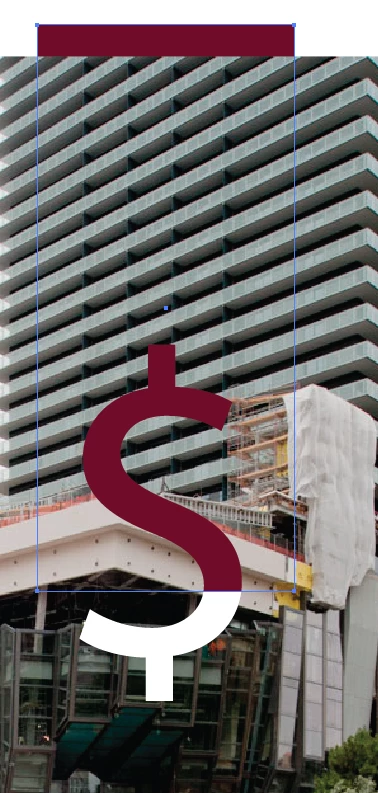
I would like to "cut out" a dollar sign ($) shape from a jpeg image so that I can "see through" the dollar sign to what is behind it. I have attempted to do this several times using the Compound path tool, Divide objects below, and everything else I can think of. Nothing works. First, I flatten the jpeg image. Then I create outlines of the dollar sign. When I select the dollar sign and the jpeg and click on "Make Compound Path" I get the error message: "Can't make a compound path. A compound path cannot combine a clipping mask with an ordinary path." I do not have any problems cutting through a vector image. For some reason this jpeg is giving me problems. Can you help?

Thanks
    This topic has been closed for replies.
    Correct answer Wade_Zimmerman1

    You want to set it up the same way and make an inverted opacity mask.

    select the $ and the jpeg with the $ on top can be live text in case you need to change to pounds or euro.

    then in the transparency panel select from the flyout Make Opacity Masks then in the transparency panels setting uncheck clip if selected and check invert.

    You should get this

    1 reply

    Larry G. Schneider
    Community Expert
    Community Expert
    June 9, 2010

    What happens if you select both the dollar sign and the jpeg and use Clipping Mask>Make?

    June 9, 2010

    This cuts away the entire jpeg image except for what is directly beneath the dollar sign. the image in the shape of the dollar sign. I need the dollar sign to act like a cookie cutter and cut through the jpeg so that the dollar sign area is transparent and everything outside the dollar sign remains.

    Thanks for your help!

    Larry G. Schneider
    Community Expert
    Community Expert
    June 9, 2010

    Just fill the $ with white or the color of the background.