mcewthom
Participant
January 9, 2021
Answered

Cutsom width profiles.

  • January 9, 2021
  • 5 replies
  • 666 views

Is it possible to make a new width profile? 

I want a stoke that will only "backfill" into the object, the one below is the closest I can get but the stroke still protrudes out the shape slightly and also has the tapered edges. 
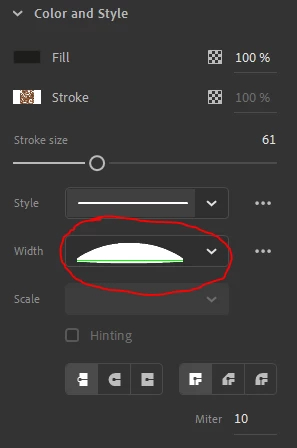
 

Any help much appreciated. 


This topic has been closed for replies.
Correct answer Kurt Gold

I think your screenshot is taken from Adobe Animate, not Illustrator.


You may ask in the Animate forum.


https://community.adobe.com/t5/animate/bd-p/animate?page=1&sort=latest_replies&filter=all


5 replies

Kurt Gold
Community Expert
Kurt GoldCommunity ExpertCorrect answer
Community Expert
January 10, 2021

I think your screenshot is taken from Adobe Animate, not Illustrator.


You may ask in the Animate forum.


https://community.adobe.com/t5/animate/bd-p/animate?page=1&sort=latest_replies&filter=all


Doug A Roberts
Community Expert
Community Expert
January 10, 2021

So it is! I must be needing glasses.

Kurt Gold
Community Expert
Community Expert
January 10, 2021

About what application are you talking here?


I'm just asking because in the desktop version of Illustrator I've never seen a panel like the one you show in your initial post.


S_Gans
Community Expert
Community Expert
January 10, 2021

Width profiles are made with the width tool. They can be saved at the bottom of the Stroke panel. If you don't see that area in the stroke panel, please go to the panel menu, in the upper right corner of the panel (3 or 4 little lines) and select "show options"

Adobe Community Expert / Adobe Certified Instructor
jane-e
Community Expert
Community Expert
January 10, 2021

"stroke still protrudes out the shape slightly and also has the tapered edges. "

 

Hi

If you are asking how to create a new width profile, then Doug gave you the answer. If you are asking how to make it appear the way you want, you might double-click each width point and type the numbers you want. They don't have to be the same on both sides. Please clarify.


See these links for more info:

https://creativepro.com/getting-a-handle-on-illustrators-width-tool/

https://www.adobepress.com/articles/article.asp?p=2466676&seqNum=3


~ Jane

Doug A Roberts
Community Expert
Community Expert
January 9, 2021

Yes, use the Width tool the create the profile you want and then use the little save icon in the width profile drop-down.