Participant
July 24, 2020
Answered

cutting out sections within a polygon

  • July 24, 2020
  • 2 replies
  • 530 views

I need to cut out several areas within an existing polygon. How do I do that please.

This topic has been closed for replies.
Correct answer Michael Bullo

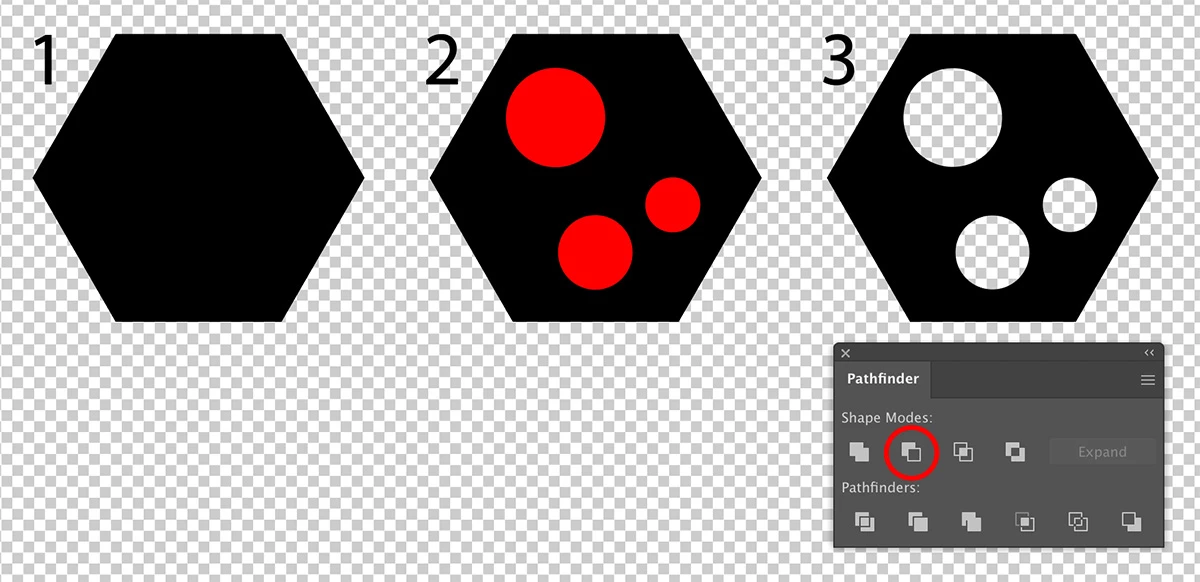
  1. Draw your primary shape.
  2. Draw the shapes that will be used to cut holes in your primary shape. Their appearance does not matter.
  3. Select all of the shapes, including the primary shape, and select the Minus Front button from the Pathfinder panel (second button on the first row).


Note: If you hold down the Alt/Option key while pressing the Minus Front button you will create a Compound Shape. Visually this will look the same as before but it will make any potential editing much easier. With the Direct Selection tool (white arrow) you can select the shapes that created the holes and move them around.

2 replies

Participant
July 24, 2020

Thanks for that.

Ken Sherry

personal details removed

Michael Bullo
Community Expert
Community Expert
July 24, 2020

No worries

Michael Bullo
Community Expert
Michael BulloCommunity ExpertCorrect answer
Community Expert
July 24, 2020

  1. Draw your primary shape.
  2. Draw the shapes that will be used to cut holes in your primary shape. Their appearance does not matter.
  3. Select all of the shapes, including the primary shape, and select the Minus Front button from the Pathfinder panel (second button on the first row).


Note: If you hold down the Alt/Option key while pressing the Minus Front button you will create a Compound Shape. Visually this will look the same as before but it will make any potential editing much easier. With the Direct Selection tool (white arrow) you can select the shapes that created the holes and move them around.

Participant
July 24, 2020

Hi, why when i do this, the shape i cut out is filled in black rather than being deleted and transparent? 

Michael Bullo
Community Expert
Community Expert
July 24, 2020

Can you post a screen shot?