Participant
April 16, 2024
Answered

Cutting silhouette shape into text

  • April 16, 2024
  • 2 replies
  • 573 views

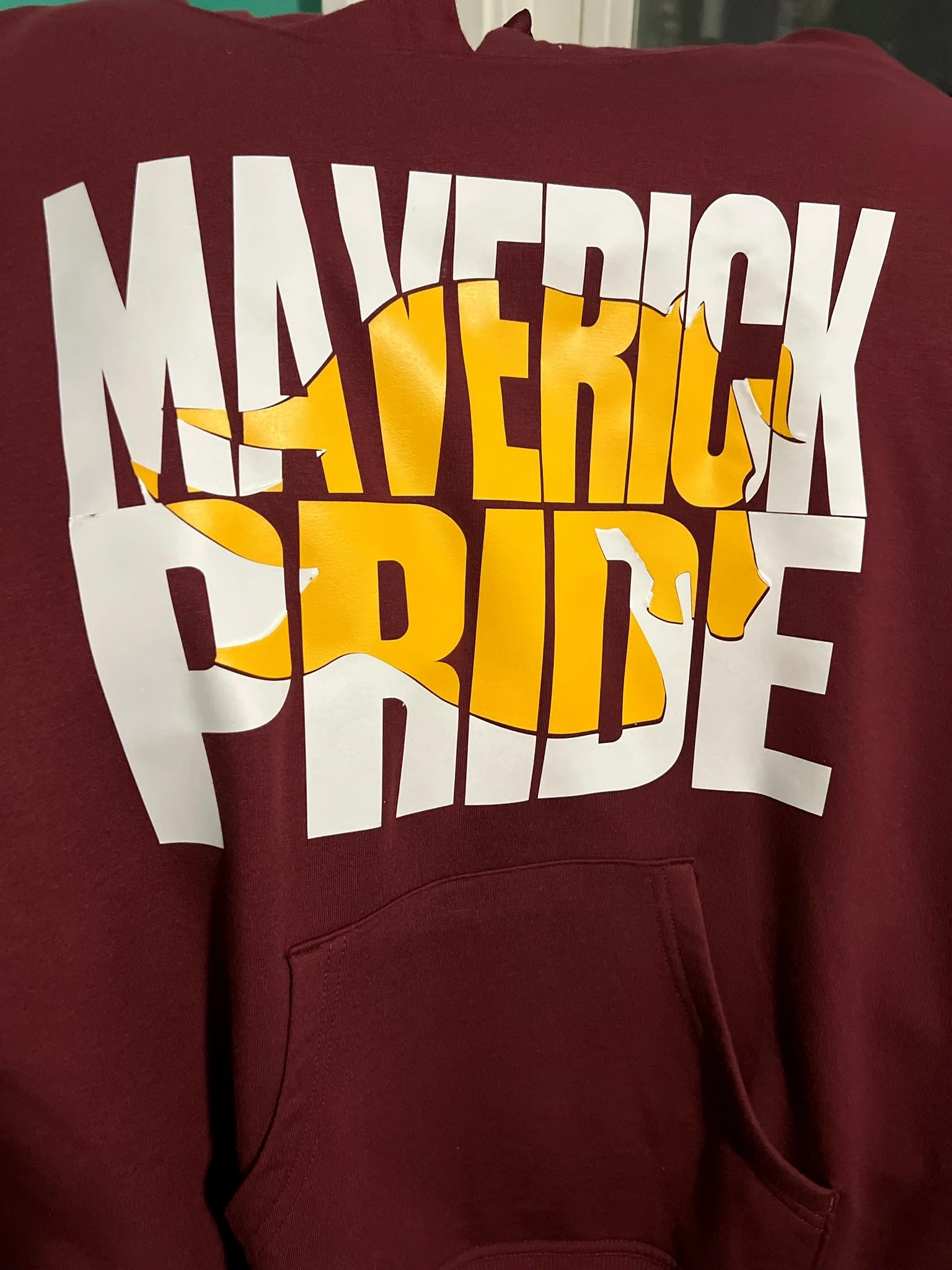
How can I recreate something like this horse's head cut into the text?
This topic has been closed for replies.
Correct answer Jacob Bugge

Erin,


Depending on the possible uses of the artwork, you can make the (apparent) cutout in different ways, including reversibly (beyond Undos and keeping the original parts to fall back on) such as a(n Opacity) Mask of a copy (possibly altered) shape.


The actual relation between the coloured horse and the (cutout) copy shape is more akin to moving the latter (or parts of it separately) in order to create an enhancement in the form of a more lively (varying/partial) shading/3D appearance rather than a flat offset.


A further enhancement appears in connexion with the letters MAVER made by adapting/moving parts, and this could also be used for inspiration.

2 replies

Jacob Bugge
Community Expert
Jacob BuggeCommunity ExpertCorrect answer
Community Expert
April 16, 2024

Erin,


Depending on the possible uses of the artwork, you can make the (apparent) cutout in different ways, including reversibly (beyond Undos and keeping the original parts to fall back on) such as a(n Opacity) Mask of a copy (possibly altered) shape.


The actual relation between the coloured horse and the (cutout) copy shape is more akin to moving the latter (or parts of it separately) in order to create an enhancement in the form of a more lively (varying/partial) shading/3D appearance rather than a flat offset.


A further enhancement appears in connexion with the letters MAVER made by adapting/moving parts, and this could also be used for inspiration.

Monika Gause
Community Expert
Community Expert
April 16, 2024

@Jacob Bugge  schrieb:

Erin,


Depending on the possible uses of the artwork, you can make the (apparent) cutout in different ways, including reversibly (beyond Undos and keeping the original parts to fall back on) such as a(n Opacity) Mask of a copy (possibly altered) shape.


If you also want the small margin around the horse's head, then an opacity mask would not be very efficient. A knockout group would do a better job (peovided you create the margin with an effect)

Jacob Bugge
Community Expert
Community Expert
April 16, 2024

Monika, there are indeed different ways to obtain the desired appearance depending on which finer details and workflow options are chosen/included, hence my open ended post.

Monika Gause
Community Expert
Community Expert
April 16, 2024

Outline the text.

Put the horse there

Select the outlines text and the horse

In the Pathfinder panel click on Merge


As in that image you might want to first apply Object > Path > Offset path to the horse and then Marge that. In that case you will need to delete the horse and then just keep the original horse shape with the text.

Participant
April 18, 2024

Thanks so much for your help, Monika-- I really appreciate it!