

Inspiring
September 13, 2025
Answered

Damaged error Illustrator Beta won't open

  • September 13, 2025
  • 2 replies
  • 391 views

When I try to open Illustator Beta I get this message: 
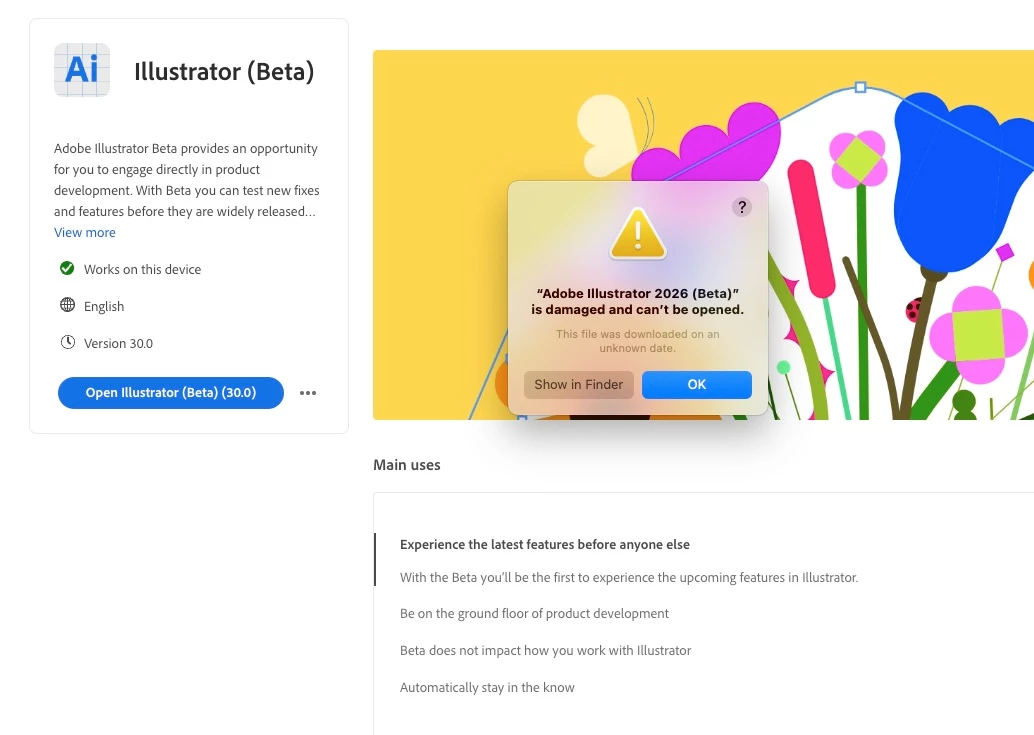
I have tried uninstalling Beta and reinstalling it, and I still get this error. I would like to continue using Beta. How can I fix this??

Correct answer Jena31657898le31

I did some more finagling with it and finally got it to reinstall with no issues.

2 replies

Participating Frequently
September 22, 2025

I'm having the same issue, how exactly did you end up fixing it? I've renistalled it twice now to no avail.

Anubhav M
Community Manager
Community Manager
September 22, 2025

Hello @Rhiannon29523904mikn,

I'm sorry to hear about your experience. Would you mind trying the following steps and checking if it helps:


  • Close all Adobe applications
  • Remove Illustrator (beta) using the Creative Cloud Cleaner Tool (https://adobe.ly/3VtTMLa)
  • Reinstall Illustrator (beta) from the Creative Cloud Desktop application (https://adobe.ly/46NiSe9)
  • Relaunch Illustrator (beta)


Looking forward to hearing from you.

Anubhav

Participating Frequently
September 25, 2025

Thank you for your reply. I found that just forcing it open as it seemed to be a security issue rather an actual corrupted file (it says it's damaged but it's not really). 


I'm on a Mac so I'm not sure how this would be done on a PC, but I went to the Application folder in finder, then control-clicked on the Illustrator Beta app, and through that menu opened it. It gave me a security warning which I could overide and now it opens no issues. 

Jena31657898le31AuthorCorrect answer
Inspiring
September 13, 2025

I did some more finagling with it and finally got it to reinstall with no issues.