Participant
August 4, 2019
Answered

Dashed lines down side of page when exporting from Illustrator to PDF

  • August 4, 2019
  • 2 replies
  • 1321 views

Hi everyone,

I am fairly new to using Illustrator, but have checked all the forums and can't find an answer to my problem.

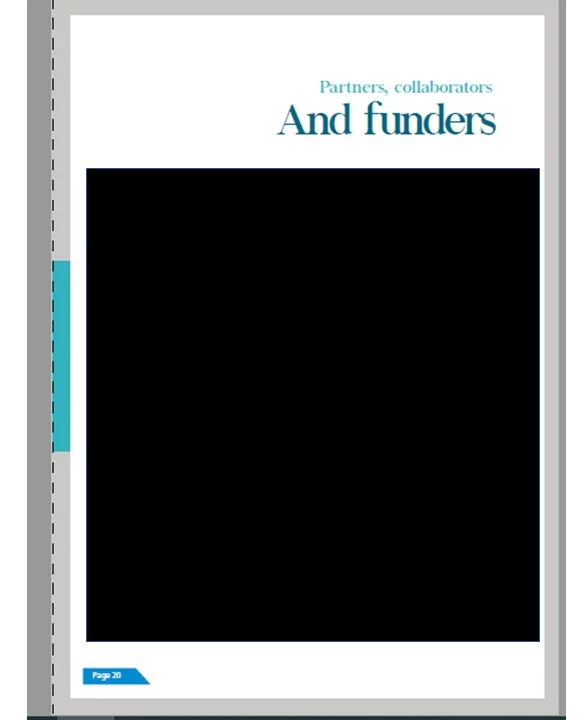
When exporting from Illustrator to PDF, some of the pages in my PDF have dashed lines down the side of the page (not the print tiling). See image below.

Does anyone know what might be causing this? And of so, how can I remove it?

Thanks
This topic has been closed for replies.
Correct answer davev59285388

I managed to figure it out. Somehow there was a layer with dashed lines, so it was nothing to do with exporting the file to PDF. Thanks for everyone's help.

2 replies

davev59285388AuthorCorrect answer
Participant
August 5, 2019

I managed to figure it out. Somehow there was a layer with dashed lines, so it was nothing to do with exporting the file to PDF. Thanks for everyone's help.

Jacob Bugge
Community Expert
Community Expert
August 5, 2019

Thank you for sharing, Dave.

Monika Gause
Community Expert
Community Expert
August 4, 2019

Which app do you use to open the PDF?This might just be some option inside that app.

Participant
August 4, 2019

I open it with Adobe Acrobat Pro. I don't think it is the app, as only some pages have these dashed lines whilst other do not.

Jacob Bugge
Community Expert
Community Expert
August 4, 2019

Dave,

Can you show a similar undashed page?