
Debugging Script in VS Code on PC
Hey there folks. Hope you're safe and isolated with very clean hands.
As are many many people, I've been scrambling to expand the availability of my suite of scripts now that our staff is working remotely (but even more frustratingly... on their own personal computers with wildly unpredictable file system setups). For years I had requested a work from home setup, and I had been told in no uncertain terms that WFH was NEVER going to happen. So, naturally, I didn't waste any time worrying about whether my scripts would work outside the building.. I have made my best effort at relegating all file/folder path definitions to the realm of concatenated variables to make it easier to make one change to a root folder without being required to do extensive refactoring. In theory, this made it pretty easy for me to just do an operating system check at the beginning of the script and define the standard network file/folder paths appropriately. (all of the dependencies for my scripts live on a shared server so that none of the artists need to take action when I make an update. This means that when working remote, we must connect via VPN and mount the necessary network drive).
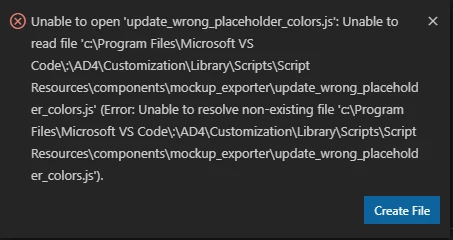
Anyway, that's quite enough fluff.. Here's the rub. While the VPN causes the script to run at an excruciatingly slow pace, I have been able to successfully locate and include the necessary dependencies.. However, I'm encountering some silent error(s) in at least one component, but I'm unable to use the step functions in VS Code to identify the problem... The files appear to be successfully included, but if I place a breakpoint at the function call and then try to step into the function, I get an error message (see screenshot) and the script simply quits. The file path in the error message is correct, except for the "c:\Program Files\Microsoft VS Code\:"
It appears that VS Code is attempting to save the included file in a temp location during script execution? Does anyone know why VS Code is trying to open the files from the C drive even though I'm explicitly pointing to the network drive? Again, the files are found, and they are included, and the functions contained in those files are accessible by the script.. but only if i let the script run on it's own. If i attempt to see what's going on, the behavior changes... It's a classic "double slit" phenomenon.. The presence of an observer alters the outcome of the experiment..
Anyone have any advice on how to debug these files from where they are instead of being required to duplicate them locally and change the path? Maybe there's something I can put into the config file to dictate where files get 'stored' during execution?
Please help. I'm going to throw my computer through the wall, but I don't actually own the wall or the computer... 😃
Thanks, folks.
 AdChoices