


Participant
April 10, 2025
Answered

Deciphering/recognizing gradient to replicate them

  • April 10, 2025
  • 1 reply
  • 347 views

Hello everyone and thanks to those who would like to participate in the discussion and help me learn.

I am trying to replicate an effect present on a graphic element extracted from a PDF; I don't know if it is a gradient, a glow, a blur therefore I can't replicate the object in all its features.

Surely an insider will understand at first glance what is present on the exterior in a shaded burgundy of the element depicted in the next image:

 

Thanks to “edit PDF” I was able to extract all the different components of the element (via Acrobat Pro's context menu it gives me the option to edit the element using Illustrator). So I know that gradients have been applied but I don't know what kind they are and how they were obtained. Basically I have extracted burgundy filled rectangles with 30% opacity that have the geometric shape of the element inside them with very ill-defined/blurred white outlines.


If they are superimposed on the geometric shape they generate the gradient I am trying to replicate.


Forgive me if what I just wrote comes across as very confusing and is not described using appropriate language but I hope the image is more explanatory.


In any case, I also attach a screenshot of the elements extracted in Illustrator
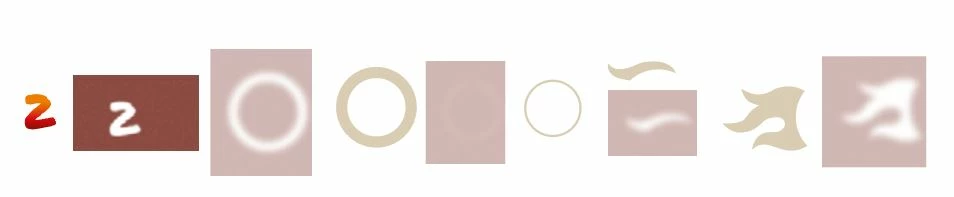
Thank a lot to all the community members will spend their time to help me

Correct answer Bobby Henderson

The red object in the center of the white circle looks like it has a combination of effects applied to it. The "S" or "5" shape may be compounded with the white circle shape so it acts like a hole to reveal another shape behind it that actually has the red-orange gradient applied to it. The circular white shape above it with the S/5 hole cut through it could have a drop shadow effect applied to it. The shadow effect would fall on the red-orange gradient underneath it.

1 reply

Community Expert
April 10, 2025

You can write responses in your native language. As far as I can tell the forum's translate feature works pretty well.


The effects applied to the artwork elements look like Photoshop style effects that are pixel-based. It looks like the Inner Glow effect was applied to the flame shapes and outer ring shapes. The red icon in the middle has a drop shadow effect applied.

Participant
April 10, 2025

A thousand thanks @Bobby Henderson for the response!

The effect present on the element has been deciphered and indeed that was my request; so it is External Glow applied to all the "flame shapes" and to the large circle containing the (page) number.

The small circle on the other hand is just filled with color #640C00.

How can I do to replicate it on my project?

I have all the elements but I don't know how to replicate the effect. I did a few tests using the gradient tool but nothing came out even close to what I'm trying to replicate.

Thanks again in advance for your future reply when possible

 
Bobby HendersonCommunity ExpertCorrect answer
Community Expert
April 11, 2025

The red object in the center of the white circle looks like it has a combination of effects applied to it. The "S" or "5" shape may be compounded with the white circle shape so it acts like a hole to reveal another shape behind it that actually has the red-orange gradient applied to it. The circular white shape above it with the S/5 hole cut through it could have a drop shadow effect applied to it. The shadow effect would fall on the red-orange gradient underneath it.