Participant
August 18, 2024
Answered

decreasing distance between lines

  • August 18, 2024
  • 3 replies
  • 368 views

I have some old graphic illustrations for the 1800's and they use a blend-like series of lines, but the distance between steps decreases as the pt of the line gets smaller.
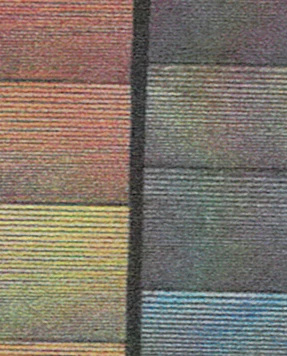
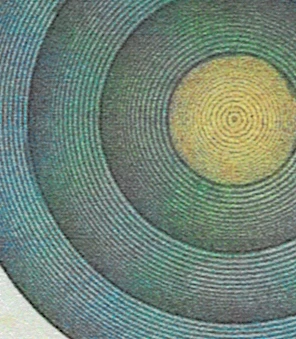
Is there a straightforward way to do this in Illustrator. Like I said, it's blend-like, but I couldn't find an option to makes steps in distance. A nice thing about this technique is that it looks like a gradient by having a solid color underneath and an opaque series of lines simultaneously increasing in density and decreasing in pt size.

Thanks!

This topic is closed to new replies. Start a new post to keep the conversation going.
Correct answer Monika Gause

These are probably brushes (art brushes)

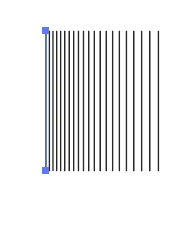
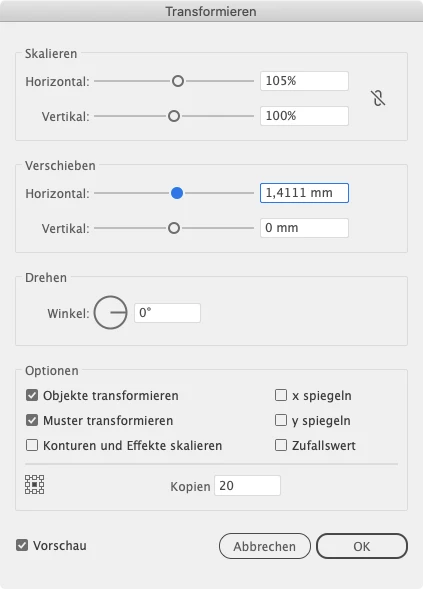
what you can do to create them is draw a line and then apply Effect > distort & transform > transform using settings like these:


Expand appearance and drag the thing in the brushes panel. It's a good thing to make this with black strokes, because then youz can use the colorizatio method Tints and apply a stroke color to get them in all colors you like.

3 replies

Monika Gause
Community Expert
Monika GauseCommunity ExpertCorrect answer
Community Expert
August 18, 2024

These are probably brushes (art brushes)

what you can do to create them is draw a line and then apply Effect > distort & transform > transform using settings like these:


Expand appearance and drag the thing in the brushes panel. It's a good thing to make this with black strokes, because then youz can use the colorizatio method Tints and apply a stroke color to get them in all colors you like.

Participant
August 18, 2024

Thank you! Lots to play with, would t have thought of it on my own

Monika Gause
Community Expert
Community Expert
August 18, 2024

You're welcome!