

Mike_Gondek10189183
Community Expert
Community Expert
September 2, 2010
Answered

Deleted Global Colors/[HUH?] error/Unused Brushes Keep Returning

  • September 2, 2010
  • 12 replies
  • 69459 views

On Mac AI4 I inherited files, that have 1000s of duplicate brushes in the library. Any copying is slow and pasting between documents fills the swatches palette with 1000s of Deleted Global Colors and brushes. The files are excessively large, slow and any copying is really slow. Can't load CS5 trial here at work(to try out that new cleanup command). This problem has been on the forums before (MAC/PC/CS3/CS4), but has not been solved. I started this as a new thread, as this problem is spreading out of control on other files.
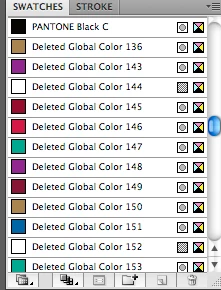
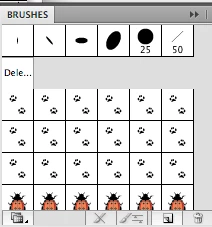
Here is what I have tried so far that has not worked (as the files are slow/crashing and the brushes keep coming back)

  1. Recovered the file using 'Content Recovery Mode = 1". Edited this in simpletext to remove all code that has "Deleted global colors" & the "Begin PluginObject: Object". There was lots of junk to remove and I got everything in between the open & close tags.
  2. Saved files as AI3
  3. Copied & Pasted all elements into a new document
  4. Removed all unused Brushes, Swatches, Graphic Styles
  5. Deleted all layers/objects & did a save as, and the file is still 6mb.

The "deleted global colors"(see images below) problem has gotten better since cleaning up the code. The problem must lie in in the non-standard characters of the code, as I used search to flush out all items with "Deleted global" and "BeginPlugInObject" between start and ends tags. I also am getting the HUH error(see images below) when saving.
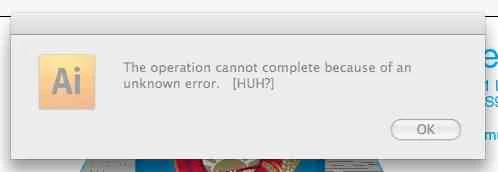
HELLp

    This topic has been closed for replies.
    Correct answer Nils M. Barner

    Today, our studio(150 AI users strong) is still dealing with supplied Ai files with this crippling bug/corruption/virus!

    As I stated/adapted in an earlier post, the procedure by kuongchin6600 has worked on every file thrown at us. And we have some heavily affected files! Symptoms of not printing, not being able to save, slow responding,  several times the normal Ai file sizes, and unexpecting crashes add to the already heavily stressed design/production staff. We have mandated that every user has the Brushes palette open for early detection of the bug. With thousands of Ai files on our servers, budgets/deadlines don’t allow 10-15 minutes per file altering code that will cause missing text or improper colours on a major campain!? By our standards, these are very serious alterations that cannot be risked or passed onto released production. It is a very difficult task to keep everyone  in, and outside our studio informed of the damage of a casual cut and paste in Illustrator. I find it curious that Adobe hasn’t chimed in here.... wonder how many calls on their customer support lines have been misdiagnosed? I know of three other agencies/suppliers dealing with this. So in the hopes of saving others from losing their minds/clients or lost revenue....I will repost the fix. Goodluck.

    1) Unlock all layers and elements and "Show All"

    2) Make sure "Paste Remembers Layers" is on in the Layers palette

    3) Select all

    4) Open a new blank document

    5) Drag the contents of the infected file to the new blank document

    6) In the new document, check that the palettes are clean.

    7) Save the new document with a new name. Click Use Compression only in options.

    8) Close the infected file without saving it

    9) Delete or quarantine the infected file and notify Project Manager.


    As I said before, this issue is fixed.

    If you are using Ai CS5 or CS6, feel free to follow these steps:

    http://helpx.adobe.com/illustrator/kb/copy-paste-artwork-slow-or.html

    12 replies

    October 28, 2010

    Adobe's Teri Pettit posted the solution here:

    http://adobe.groupbrowser.com/t177412.html

    on March 19, 2009.

    The link won't open on my computer, so I don't know if that site is still active or not.

    Inspiring
    September 2, 2010

    First do a save as using a different name you canalways change it back.

    then close the document  open the newly named document copy and do another save as close and open the document and do another save as.

    Now close it again create a new blank document to the dimensions of the copied document. then place the last save as document in the empty document. Now try to delete the brushes then the coor swatches.

    Do a save as three times again then close and see if it is still there.

    Mike_Gondek10189183
    Community Expert
    Community Expert
    September 2, 2010

    Thanks for your reply. Tried doing the six save as and did not notice any change in filesize. DId a test afterwards with just the logo and you can see the change in filesize below. The filesize is not a problem just the SLOW copying and crashing, but that is what I am monitoring to help cleanse these files.

    Is there anyone I can email this 5.5mb to. Was 22mb prior to pdf compatible.

    Participant
    October 14, 2010

    Hi Mike

    I have been experiencing the exact same problem, you are describing above ( Deleted Global Colors/[HUH?] ). I feel your pain!

    We have 4 imacs running in our studio and first encountered this issue about a year ago in CS3, we upgraed to CS4 in the vain hope it would go away, alas it stayed with us, I have now upgraded to CS5 and the probelem still exists. I have raised the issue with Adobe and they made me run through some exercises. Such as using the new action in AI "Delete unused panel items". This has made no difference and in fact we had been removing the panel items manually anyway.Once the problem exists within the file it gets transferred by copying and pasting between files. That's if you have nerves of steel, to let you wait the absolute age while trying to copy even just small vectors or even type! Then the pasting into the new document takes an age. Adobes temporary solution is a "work around" "Don't copy and paste!" Easy to say harder to put into practice!

    I have sent an infected file to Adobe to test and they said they have about 20 such on going cases they are working on.

    If you hear anything or find any solutions I would love to know. And in the mean time remember not to copy and paste!

    Many Thanks

    Mat