Inspiring
June 7, 2020
Answered

Deleting last sublayer of group.

  • June 7, 2020
  • 3 replies
  • 1786 views

Hi,


I need to delete the last layer in a group or delete a CompoundPath layer that is part of a group. Or delete a layer of a group that has a certain name. I think I need to loop through the function but I am not sure how.


These are my layers:
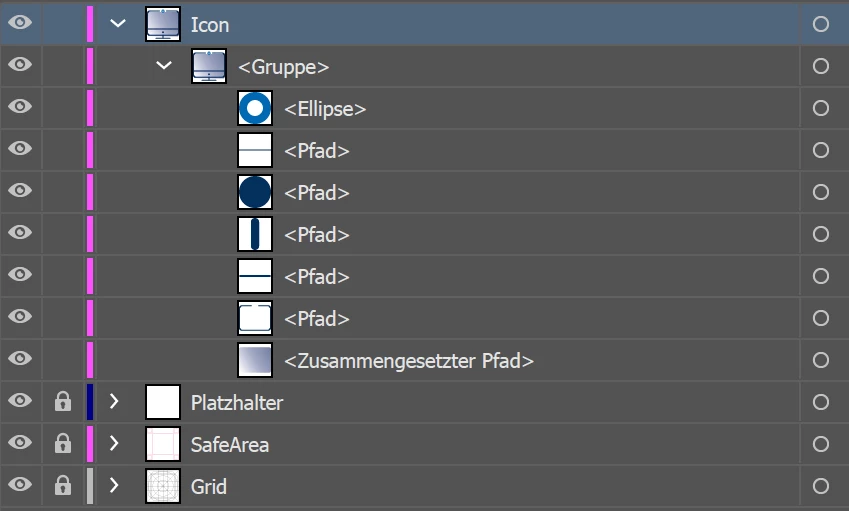


The amount of layers can vary...

Here iy my script:

   if (bks.layers.getByName("icon")){
      bks.layers.getByName("icon").locked = false;
        var icon = bks.layers.getByName("icon");

        for(var i = 0; i < icon.pageItems[0].pathItems.length; i++){
            var iconpath = icon.pageItems[0].pathItems[i];
            var iconobj = icon.pageItems[0];
            iconpath.strokeColor = grau;
            var ab = bks.artboards[0];
            var artboardRight   = ab.artboardRect[2];
            var artboardBottom  = ab.artboardRect[3];
            var artboardX       = ab.artboardRect[0];
            var artboardY       = ab.artboardRect[1];
            var horziontalCenterPosition = (artboardRight - iconobj.width)/2;
            var verticalCenterPosition = (artboardY + iconobj.height)/2;
            iconobj.position = [horziontalCenterPosition, verticalCenterPosition];
        }
    }


This topic has been closed for replies.
Correct answer femkeblanco

This works really well, however I have a sceond question. Is it possible to adapt it fpr a text element?


I've tried this but it doesn't work. 


  var app = app.activeDocument;

     var group = app.layers["Icon"].groupItems[0];
        for (var i = (group.pageItems.length) - 1; i >= 0; i--) {
          if (group.pageItems[i].typename == "TextFrameItem") {
            group.pageItems[i].remove();
          }
        }

The "typename" of text is "TextFrame".  


So try this:


var group = app.activeDocument.layers["Icon"].groupItems[0];
for (var i = (group.pageItems.length) - 1; i >= 0; i--) {
  if (group.pageItems[i].typename == "TextFrame") {
    group.pageItems[i].remove();
  }
}


3 replies

Charu Rajput
Community Expert
Community Expert
June 8, 2020

Hi,

Just for your information, you can refer following Javascript Guide for Illustartor. This will helps you.


http://wwwimages.adobe.com/content/dam/acom/en/devnet/illustrator/pdf/Illustrator_Scriptin_Reference_JavaScript_cc.pdf


Best regards
Inspiring
June 9, 2020

Thanks. I already did all the reading I could to find the solution on my own. I would not have posted here if that weren't the case.

My main source is this:
https://illustrator-scripting-guide.readthedocs.io/

Charu Rajput
Community Expert
Community Expert
June 9, 2020

Thats great!

Best regards
Charu Rajput
Community Expert
Community Expert
June 8, 2020

Hi,

First of all you need to correct your terminology here. For an example, you said "last layer in a group". Well layer cannot present inside the. A group can exists inside the layer. As per screenshot, here is the description we understand,

"Icon" is the name of the layer. This layer consists of one group. And this group have different objects like ellipse and other objects. Refer screen shot for more details


So I think you need the following the things. And please correct we something is wrong.

  • Delete last item in a group inside layer named as "Icon"
  • Delete all compound path from a group inside layer named as "Icon". Compund Path should be deleted from all groups exists inside the layer named "Icon"?
  • Delete layer with certain name. 


If these are your scenarios, then you can try following script for each of them


var docRef = app.activeDocument;

/*******************************************************************
	Method to delete last item from first group inside the layer.
*******************************************************************/
function deleteLastItemFromGroup(layerName) {
    var _layer = docRef.layers[layerName];
    var firstGroup = _layer.groupItems[0];
    var lastIndex = (firstGroup.pageItems.length) - 1;
    firstGroup.pageItems[lastIndex].remove();

}

/*******************************************************************
	Method to delete all compund path items from all groups inside layer
*******************************************************************/
function deleteCompoundPaths(layerName) {
    var _layer = docRef.layers[layerName];
    var _groups = _layer.groupItems;
    for (var g = 0; g < _groups.length; g++) {
        var _itemLength = _groups[g].pageItems.length
        for (var c = _itemLength - 1; c >= 0; c--) {
            if (_groups[g].pageItems[c].typename == 'CompoundPathItem')
                _groups[g].pageItems[c].remove();
        }
    }
}

/*******************************************************************
	Method to delete layer by its name
*******************************************************************/
function deleteLayer(layerName) {
    try {
        var _layer = docRef.layers[layerName];
        _layer.remove();
    } catch (e) {
        alert("No layer exists with name - " + layerName);
    }
}

deleteLastItemFromGroup("Icon");    //Delete last item in a group inside layer named as "Icon"
deleteCompoundPaths("Icon");    // Delete all compund path items from all groups insid elayer named as "Icon"
deleteLayer("Icon");    // Delate layer by its name


Let us know if this helps. 


Best regards
Inspiring
June 9, 2020

Thank you for your help. The simple code from above already helped.

I want to try this out later.


I'm actually having a bit of trouble with the terminology, especially a lot of the explanation given here
I need more examples to understand it all.

femkeblanco
Legend
June 7, 2020
This will delete the last item in the first group in the "Icon" layer.


var group = app.activeDocument.layers["Icon"].groupItems[0];
var lastIndex = (group.pageItems.length) - 1;
group.pageItems[lastIndex].remove();


Alternatively, this will loop through the items in the first group in the "Icon" layer and delete compound paths.


var group = app.activeDocument.layers["Icon"].groupItems[0];
for (var i = 0; i < group.pageItems.length; i++) {
  if (group.pageItems[i].typename == "CompoundPathItem") {
    group.pageItems[i].remove();
  }
}


Neither the group nor the items in the group are named, so they cannot be deleted by name.

Charu Rajput
Community Expert
Community Expert
June 8, 2020

Hi, I think the following code will not remove all compoundPath Items from the group.

var group = app.activeDocument.layers["Icon"].groupItems[0];
for (var i = 0; i < group.pageItems.length; i++) {
  if (group.pageItems[i].typename == "CompoundPathItem") {
    group.pageItems[i].remove();
  }
}


Here is the scenario in which it fails, Consider group with two compound path Items only, The above code will delete only one compoundpath item and one is left. What your thoughts?

Best regards
femkeblanco
Legend
June 8, 2020

Yes, you are absolutely right.  It should be

var group = app.activeDocument.layers["Icon"].groupItems[0];
for (var i = (group.pageItems.length) - 1; i >= 0; i--) {
  if (group.pageItems[i].typename == "CompoundPathItem") {
    group.pageItems[i].remove();
  }
}

Thank you.