MahaB82A
August 24, 2025
Answered

Difference Between Two Expand Options

  • August 24, 2025
  • 4 replies
  • 843 views

As far as I know I couldn't see any difference in the function between these two Expand option. In my view both are same. Is there any difference?


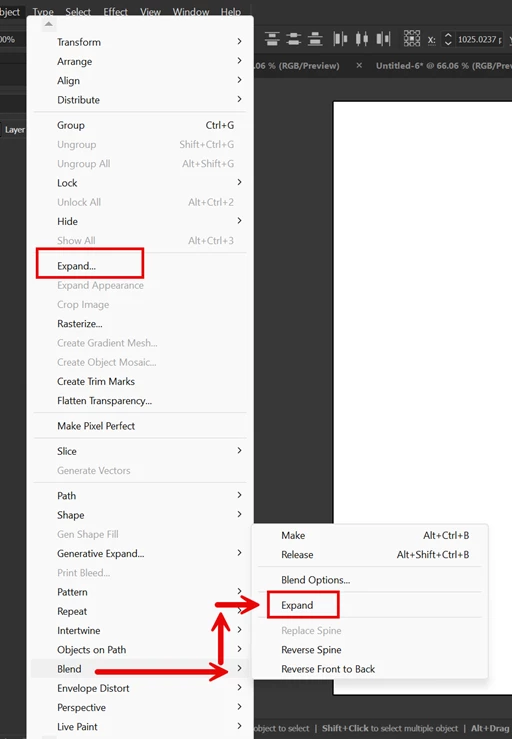
Object > Expand

Object > Blend > Expand


Correct answer Monika Gause

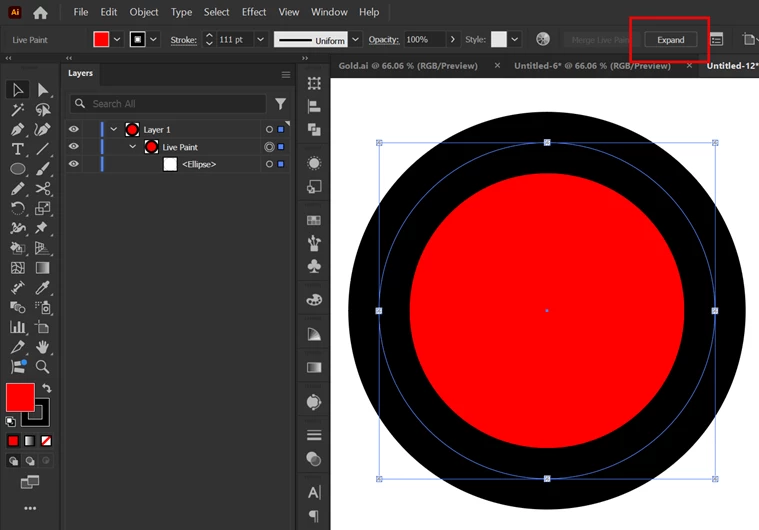
I also noticed by implementing Live Paint Bucket selection enables Expand tool appears in the main bar. But you can't see any changes in the image in Preview window by activating Expand tool. Video is upladed as well.


The whole point of Live Paint is that there are no visible changes when expanding. But when you look in the Layers panel the whole time you will of course see a change

4 replies

MahaB82A
MahaB82AAuthor
August 24, 2025

Is there any difference from above Expand & Expand in the below main bar


Monika Gause
Community Expert
Community Expert
August 24, 2025

So far I have only seen that for Live paint groups and Image Trace. It will not appear when a live paint group is selected together with a different object. So it equals the dedicated expand command.

MahaB82A
MahaB82AAuthor
August 25, 2025

I also noticed by implementing Live Paint Bucket selection this Expand tool appears in the main bar. But you can't see any changes in the image in Preview window by activating Expand tool


MahaB82A
MahaB82AAuthor
August 24, 2025

If you want to search in YouTube how to differenciate these two blends. I tried various method but the result was alaways default to Object > Expand.    

Monika Gause
Community Expert
Community Expert
August 24, 2025

What is it that you actuall want to do?

Maybe you can share a screenshot?

Monika Gause
Community Expert
Community Expert
August 24, 2025

Blend > Expand will just expand blends even if you have also selected Repeats.

Object > Expand will expand everything it can expand.

MahaB82A
MahaB82AAuthor
August 24, 2025
quote

Blend > Expand will just expand blends even if you have also selected Repeats.


By @Monika Gause

What is meant by "Selected Repeats"?

Monika Gause
Community Expert
Community Expert
August 24, 2025

You can create Repeats (Radial, Grid, Mirror)

THey are live objects and you can select them.

Ton Frederiks
Community Expert
Community Expert
August 24, 2025

The one for Blends has no options. The Object > Expand is used for Appearances and has options.

https://helpx.adobe.com/illustrator/using/grouping-expanding-objects.html