
Participant
August 22, 2022
Answered

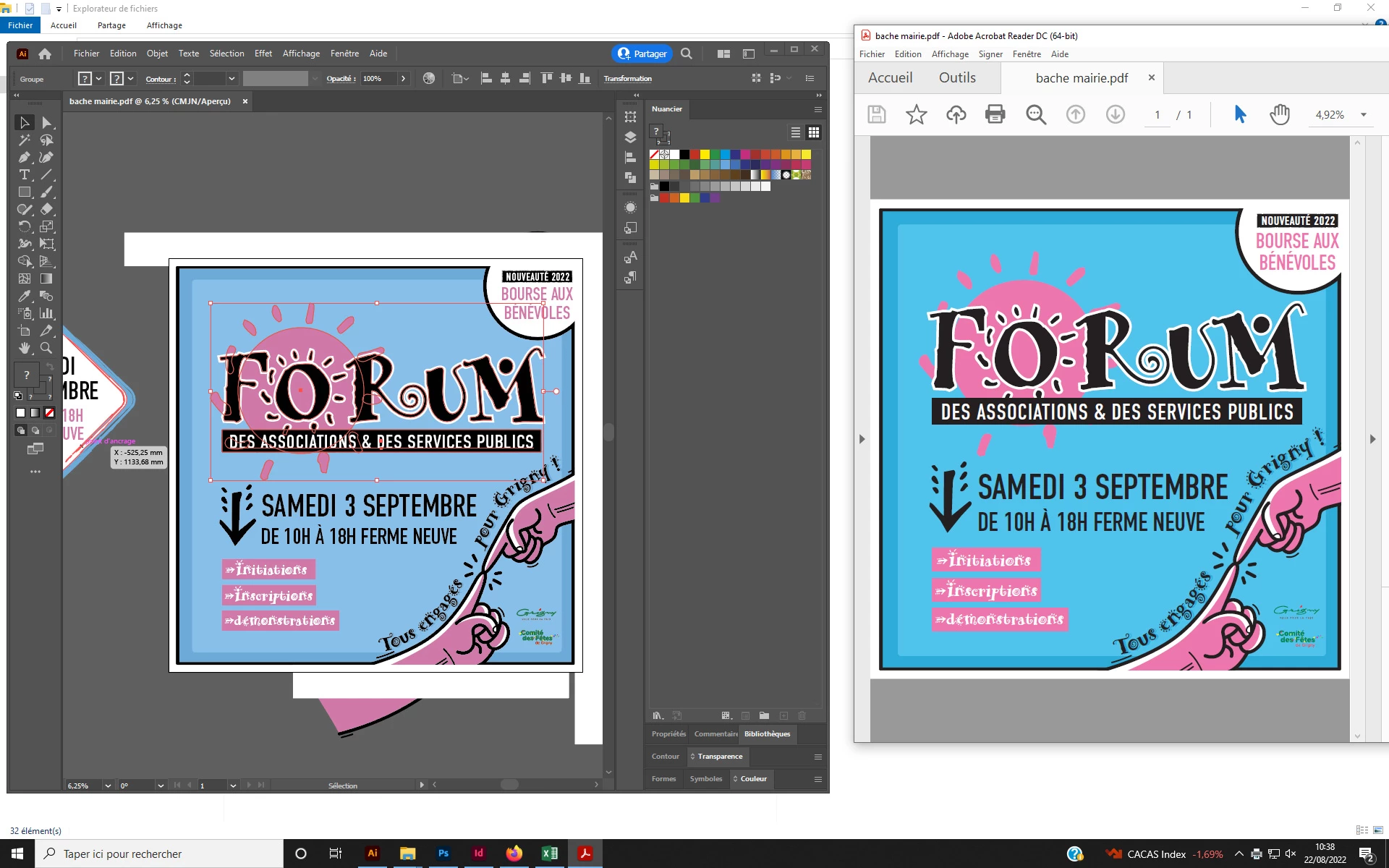
différence de couleur entre illustrator et le pdf

  • August 22, 2022
  • 3 replies
  • 1624 views

Bonjour

Depuis un changement d'ordinateur, je rencontre un probleme au niveau des logiciels adobe et lors de l'affichage des pdf.

En effet, sur illustrator, les couleurs que je souhaites semble s'afficher correctement, mais dés que j'ouvre le meme pdf avec acrobat reader (ou même l'aperçu windows), les couleurs ne correspondent pas. J'ai tout essayé au niveau profil de couleur, etc, je suis perdu, qqn peut-il m'aider ?
This topic has been closed for replies.
Correct answer CAMILLE32020975lwm8

Do not change this to "Emulate Illustrator 6".


The Coated FOGRA 39 in most areas of Europe is considered outdated. But apart from that, your color settings should not cause this. BUT: You need to turn on all the checkboxes for the warnings. So that you get notified when something goes wrong.


Did you check the color values in Acrobat? Did something get converted?


Hi everyone,

The issue was completely different than colour setting. 

it was much more complex and thankfully we found the solution after many research with an remarkable adobe expert.


For some reason my laptop was configurated with 2 graphic cards. 

I had no idea about this and it wasn't mentionned by the provider.

We simply desactivated one and the problem was solved.


If you are stuck in such situation it is worth calling support and share screen rather than waste time on discussions about colour profiles. The answer isn't there.


3 replies

Participating Frequently
September 3, 2024

I have the same issue, and my screen is well calibrated. I use photoshop all the time never have issues with colours when printing.


But my illustrator pdfs are over saturated.


I tried all sorts of pdf saving profils, opened in acrobat. 

this the same issue... I doesnt make sense and drives me crazy^^

Monika Gause
Community Expert
Community Expert
September 3, 2024

How is your color management set up?

Are your AI files RGB or CMYK? Which color profiles?

How do you save the PDF? Which options for color handling?


Participating Frequently
September 4, 2024

The file is CMYK.

and I tried all the pdf options, it is the same issue.


I asked my printing supplier, and they said that the pdf and ai file are same colour on their side.

When I showed him the colours on my side he was surprised. 


It is like if my illustrator wasn't well set up for my monitor.


it can't be the monitor otherwite the whole internet would be very saturated.


I can't find out what to arrange.

Anubhav M
Community Manager
Community Manager
August 22, 2022

Hello lionel24137677ejis,


Sorry to hear about this experience. As suggested by Mylenium, I would request you to check and re-calibrate your display by following these steps in order:


  1. Use the Windows key + I keyboard shortcut to open the Settings app.
  2. Click Display. Make sure you're using the recommended screen resolution for your display.
  3. Click the Advanced display settings link.
    expand image
    Now click on the link for Display Adaptor properties
    expand image
  4. Click on the option for Color management
    expand image
  5. Go to the Advanced tab and ensure all profiles are set to the System Default (sRGB). Then, click on Calibrate Display.
    expand image
  6. The wizard will now walk you through the steps to access the on-screen display menu on your monitor to set specific color settings. Click Next to continue. 
    - Adjust the gamma settings by moving the slider up or down until the small dots are barely visible.
    expand image


- Find the brightness controls on your monitor and adjust the brightness higher or lower until you can distinguish the shirt from the suit with the X barely visible.

expand image

- Find the contrast controls on your monitor and set it as high as possible without losing the ability to see the wrinkles and buttons on the shirt.

expand image

- Move the Red, Green, and Blue sliders to remove any color cast from the Gray bars.

expand image


Note: You can optionally start the ClearType tuner at the end of this calibration to make text on-screen more legible.


After the calibration is complete, kindly restart the computer and check if the colors are consistent with Windows on your Adobe apps.


Looking forward to your response.


Thanks,

Anubhav

Mylenium
Legend
August 22, 2022

Well, nothing in your images indicates that you are actually using color management and of course that would cause differences when simply relying on "dumb" default settings and not using a proof preview. If it worked on the previous computer you need to reinstate the same settings all the way through, including setting up your monitor color profile and calibration.


Mylenium