Participating Frequently
December 15, 2017
Answered

Disable automatic linked image update

  • December 15, 2017
  • 3 replies
  • 5603 views

Hi,

Is it possible to deactivate the automatic update of linked images when they changed outside of Illustrator (asking for CC2015, CC2017 and CC2018)?

Many thanks and best regards,

Matthias

This topic has been closed for replies.
Correct answer Mario Arizmendi

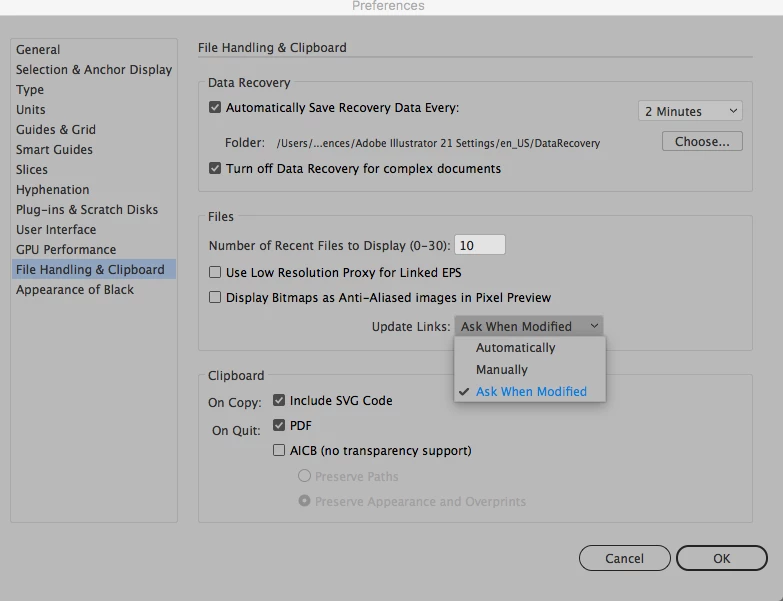
Hit command K and in the file handling option chose auto or manually, but really, why you want to do that?
3 replies

S_Gans
Community Expert
Community Expert
December 15, 2017

Just curious... if you don't want the ability to update it a linked image, why would you choose to link it? I don't mean this disrespectfully in any way - I'm genuinely curious, since to me, that's the only real benefit of linking. For me, if I didn't want the ability to update it, I'd be sure to embed it.

Adobe Community Expert / Adobe Certified Instructor
Participating Frequently
December 16, 2017

We are working with images which are linked in several Illustrator files.

Mario Arizmendi
Mario ArizmendiCorrect answer
Legend
December 15, 2017

Hit command K and in the file handling option chose auto or manually, but really, why you want to do that?

Participating Frequently
December 16, 2017

Thanks for that, I set to 'Manually' (we had 'Automatically').

The reason for my question in general was how often Illustrator checks for file changes in external links, and if there is a setting to change that behaviour. Working in an Adobe unsupported environment with a big SMB file share, remote desktops, I was curious how to optimise as best as possible our Illustrator workflow.

I could imaging a setting like update links only when opening and saving a file would be great.

JonathanArias
Legend
December 15, 2017

why don't you just make a duplicate of the file that one will not be linked? why would you not want it to update?