



Eugenia_Butko
Participating Frequently
November 22, 2021
Question

Discretionary hyphens turn into dashes

  • November 22, 2021
  • 4 replies
  • 1340 views

Illustrator turns discretionary hyphens into dashes. It happens not only in new files, but also in old files.
When I open old files, the texts become spoiled. All the discretionary hyphens turn into dashes in the middle of lines.
Example:
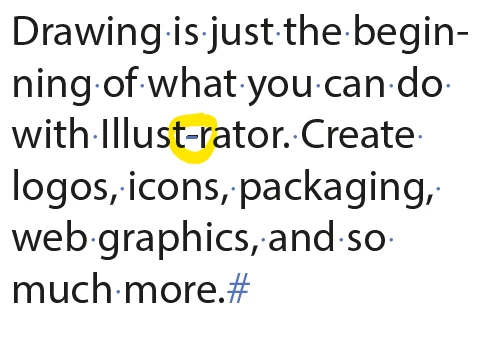
Illustrator 2022 the last version, Windows 10 Pro

(Sorry for my English))


This topic has been closed for replies.

4 replies

Eugenia_Butko
Participating Frequently
November 23, 2021

When you select this glyph, it is identified as U+00ad in the Table of glyphs, i.e. as discretionary hyphen. It is marked as discretionary hyphen with unprintable character (blue dash). It is copy+pasted into InDesign as invisible discretionary hyphen. So it does not change its type) Mystery)

Monika Gause
Community Expert
Community Expert
November 22, 2021

Currently using version 26.0.1 in English on an English system, I cannot reproduce that behaviour.


Could you perhaps share some more details of how to reproduce it?

Eugenia_Butko
Participating Frequently
November 22, 2021

Illustrator 26.0.1 (64-bit) Russian version, Russian system. 

It happens to all discr. hypens, when opening old documents and also when creating a text in new document and inserting discr. hypen. In texts in Russian and in English. 

Eugenia_Butko
Participating Frequently
November 22, 2021

hyphen )

Ton Frederiks
Community Expert
Community Expert
November 22, 2021

Looks like a bug, please report it here:

https://illustrator.uservoice.com

Eugenia_Butko
Participating Frequently
November 22, 2021
Ton Frederiks
Community Expert
Community Expert
November 22, 2021

And so did I.

Brad @ Roaring Mouse
Community Expert
Community Expert
November 22, 2021

Can confirm. Same issue on 26.0.1 on a Mac.