
Participant
August 5, 2022
Answered

dismantling someone else's logo into elements

  • August 5, 2022
  • 3 replies
  • 286 views

New to illustrator. Is there a simpler way to seperate elements of a logo other than just cutting out each individual element one at a time?


I have a logo that a friend gave me and it is made up of a number of different elements that need to be seperated in order to insert them into a laser engraving program (lightburn). In the laser engraving program I have to differentiate between filled elements and elements that just need to be traced, so I need to break up the work to make it right. 


Any help is appreciated.
This topic has been closed for replies.
Correct answer Mike_Gondek10189183
  • Select all
  • Shift Command G (do like 10x) to ensure ungrouping of all
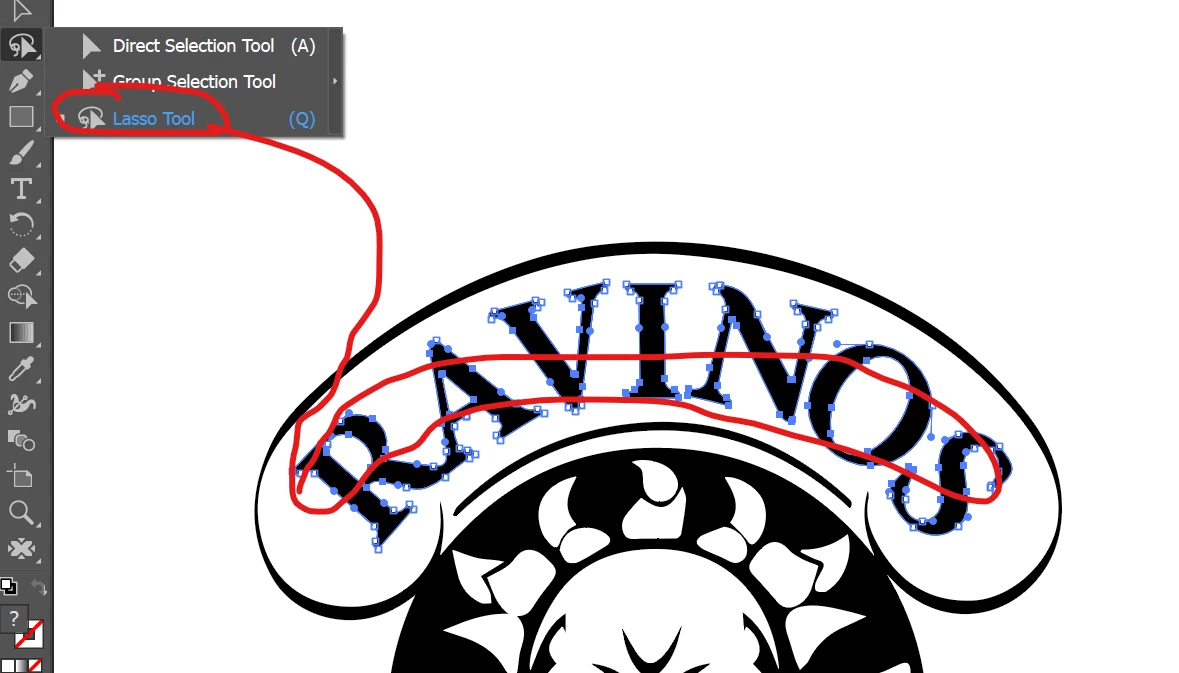
  • Select lasso tool
  • Command 3 to hide
  • select anything else you missed in group and Command 3 to hide
  • Shift Command  3 to unhide
  • The items wil be selected
  • Command G to Group
  •  

Repeat process, you may also want to use the hollow arrow tool (direct select). You can also option click with the direct select tool before starting to select by groups to inspect if good logical groups already exist. I only suggested ungrouping at first to keep my reply one answer fix all situations. 


3 replies

Mike_Gondek10189183
Community Expert
Mike_Gondek10189183Community ExpertCorrect answer
Community Expert
August 5, 2022
  • Select all
  • Shift Command G (do like 10x) to ensure ungrouping of all
  • Select lasso tool
  • Command 3 to hide
  • select anything else you missed in group and Command 3 to hide
  • Shift Command  3 to unhide
  • The items wil be selected
  • Command G to Group
  •  

Repeat process, you may also want to use the hollow arrow tool (direct select). You can also option click with the direct select tool before starting to select by groups to inspect if good logical groups already exist. I only suggested ungrouping at first to keep my reply one answer fix all situations. 


Participant
August 5, 2022

Larry G. Schneider
Community Expert
Community Expert
August 5, 2022

Can we see a screenshot?