Known Participant
Jun 16, 2024 8:12 AM UTC
Answered

Distort text

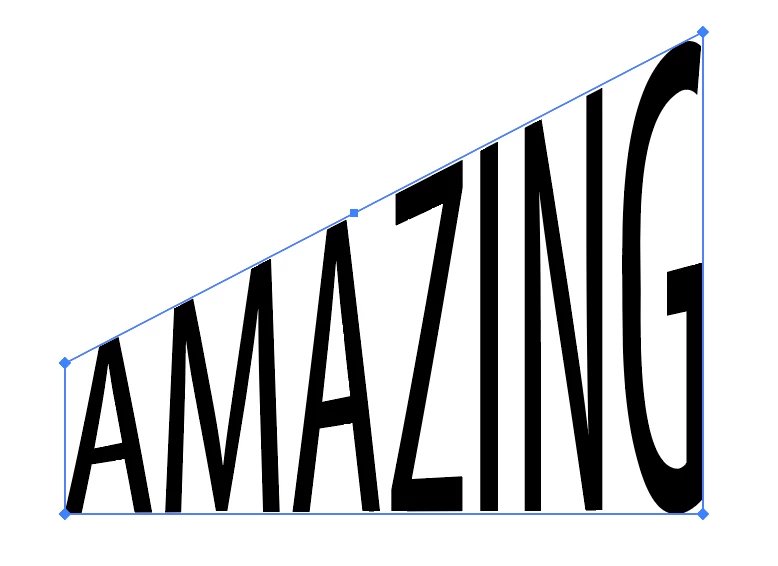
Hi there, I was wondering if anyone knows how to create text like within the image. I've tried free distort but I kind of want it without the perspective changing. Any help will be appreciated! 🙂

This topic is closed to new replies. Start a new post to keep the conversation going.
Ton Frederiks
Ton FrederiksCorrect answer
Community Expert
Jun 16, 2024 8:31 AM UTC

You could use an envelop distort with a top object. To avoid curved results see this discussion about gradient meshes:

https://community.adobe.com/t5/illustrator-discussions/envelope-distort-text-distortion-problem/m-p/12535336#M299272

7 replies

Kurt Gold
Community Expert
Community Expert
Jun 16, 2024 8:32 PM UTC

I'd agree with Bobby. If you want to get the same comeliness as in the example you provided, you would just want to draw it manually.


It's fun and spares you the ugly appearance you'd get with a raw envelope distort (no offence intended, Ton).

Translate
Known Participant
Nov 13, 2024 10:19 PM UTC

Ah thank you! I just tried it again with your suggestion and it looks great! Thanks for all your help!

Translate
Community Expert
Jun 16, 2024 4:25 PM UTC

The lettering in the sample image looks like it was hand drawn. I'm saying this because the letter strokes look uniform. Any distortion effect is going to distort the width of the letter strokes.

Translate
Ton Frederiks
Community Expert
Ton FrederiksCommunity ExpertCorrect answer
Community Expert
Jun 16, 2024 8:31 AM UTC

You could use an envelop distort with a top object. To avoid curved results see this discussion about gradient meshes:

https://community.adobe.com/t5/illustrator-discussions/envelope-distort-text-distortion-problem/m-p/12535336#M299272

Translate
Known Participant
Jun 16, 2024 9:18 AM UTC

Ah perfect thank you!

Translate
Ton Frederiks
Community Expert
Community Expert
Jun 16, 2024 9:28 AM UTC

Good to hear that helped.

Translate
MimiF
Inspiring
Jun 16, 2024 8:30 AM UTC

select the text you want to distort, right click and choose 'create outlines' once it is a group of outlines illustrator treats it as a regular artwork, you can ungroup it and work with the individual anchor points to create the effect you want


Translate