Participant
December 7, 2016
Answered

Divided shapes with Pathfinder/Color Appears in Greyscale???

  • December 7, 2016
  • 1 reply
  • 1015 views

Thanks for the moment of help,

Yeah I started tinkering with pathfinder and found I could divide shapes in CS5. Afterwards I went to fill the shapes and the color is selected as red and the screen view is gray scale. It is not a gradient selection. How do I colorize the shapes after they are divided?

The history on the build is that I took the letter V and turned the text to outlines and then divided the shape with pathfinder. Now I cannot color the shapes.

Please feel free to respond. Please no dogmatic opinions about what techniques I use unless you share techniques that are equal or greater in their response; I am not looking for anyone domineering in their response. Thank you!
    This topic has been closed for replies.
    Correct answer Ray Yorkshire

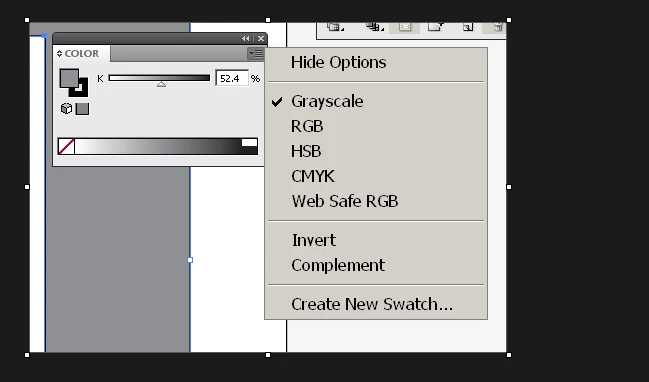
    with the object selected and go to Windows > Color

    and  in the panel click the little menu icon-  top right

    in the flyout window that opens, change from Grayscale to a colour option eg CMYK

    1 reply

    Ray Yorkshire
    Ray YorkshireCorrect answer
    Participating Frequently
    December 7, 2016

    with the object selected and go to Windows > Color

    and  in the panel click the little menu icon-  top right

    in the flyout window that opens, change from Grayscale to a colour option eg CMYK

    Participant
    December 7, 2016

    Hey thanks Ray... That was the key. How thankful I am for supporters like you who have the expertise to pass on. Simple answer but saved the day. Here's the final look:

    For inspiration or digital tools; stop by http://www.multiplythefire.com