rionorte
Known Participant
July 30, 2017
Answered

dividing a path that has an applied brush

  • July 30, 2017
  • 3 replies
  • 925 views

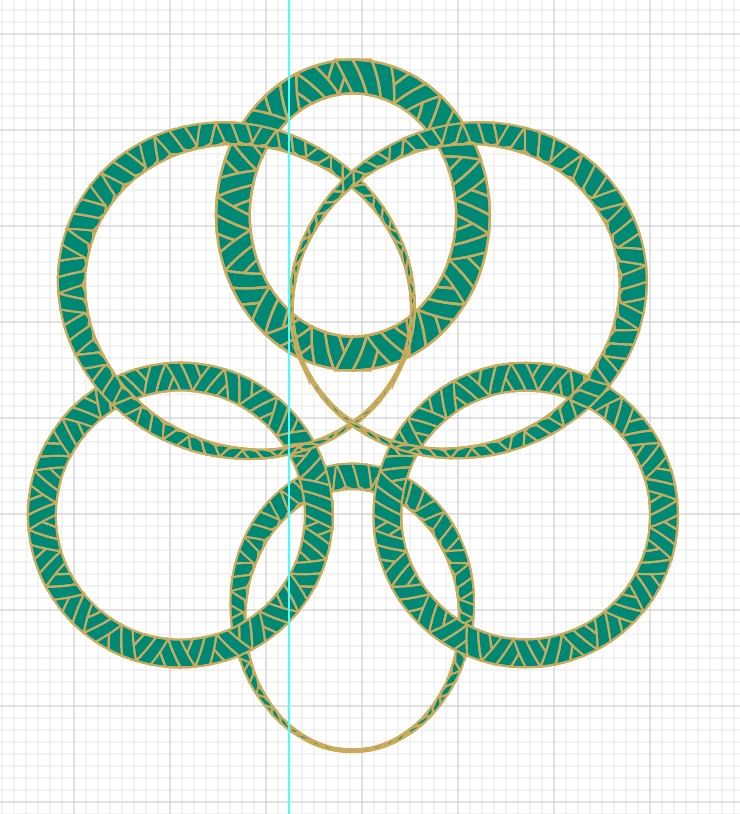
Can anyone tell me how to divide these strokes that have a brush applied so that I every intersecting piece can be moved away from the adjacent piece?  I've tried the pathfinder and expanding but not getting the results I need.  Thank you for any advice.
This topic has been closed for replies.
Correct answer Monika Gause

Thank you.

You are getting additional issues when editing the expanded brush, because the elements in your brush artwork are stacked. And there are live strokes in them, which is a problem with pathfinders.

So you would need to do some additional flattening of strokes and also flattening of the stacked elements.

It might make sense to flatten the brush artwork before creating the brush.

3 replies

rionorte
rionorteAuthor
Known Participant
July 30, 2017
Monika Gause
Community Expert
Monika GauseCommunity ExpertCorrect answer
Community Expert
July 30, 2017

Thank you.

You are getting additional issues when editing the expanded brush, because the elements in your brush artwork are stacked. And there are live strokes in them, which is a problem with pathfinders.

So you would need to do some additional flattening of strokes and also flattening of the stacked elements.

It might make sense to flatten the brush artwork before creating the brush.

Eternal Warrior
Inspiring
July 31, 2017

+1

rionorte
rionorteAuthor
Known Participant
July 30, 2017

Thanks....  It does work when I expand but it messes up my brush.  See the pattern in first picture

Monika Gause
Community Expert
Community Expert
July 30, 2017

Please upload the file to Dropbox or the like and post a link here.

That looks strange.

Monika Gause
Community Expert
Community Expert
July 30, 2017

You will first have to expand the brushes: Object > Expand appearance.

Then cut them.