
January 12, 2019
Answered

Does a Baseline Shift command actually exist, or do I have to code it myself?

  • January 12, 2019
  • 4 replies
  • 2912 views

Hi, folks. I was innocently trying to repair the labeling on a protractor by doing arched-path type 45˚-40˚-35˚ along one scale, then the same sequence along a smaller arched path below that, and In the Adobe instructions for Type-on-a-Path I was told to simply do a "Baseline Shift" to achieve the smaller version on its own baseline below the larger sequence. Right. Do a Baseline Shift. As far as I can tell, there simply is no such command or option. After running into one dead end after another, or one roster of commands to be run through Terminal, or one totally irrelevant response after another, I give up. What is Baseline Shift-a menu item that Adobe abandoned when nobody used it? It isn't there. I'm sure somebody on the forum uses it all the time and can tell me how to invoke it? Meanwhile, I suppose I can just do a copy of the larger scale and reduce it to the proper size for the smaller scale, but why the Wild-Goose-Chase?
    This topic has been closed for replies.
    Correct answer Larry G. Schneider

    to make it clearer

    4 replies

    JETalmage
    Inspiring
    January 13, 2019

    Your note about mousing over the icons got me to it, though, disguised as the subscript/superscript option in the lower left.

    Birck,

    Baseline shift and subscript/superscript are two different things. In most programs, Subscript and Superscript both move and scale the characters by predetermined proportional amounts. Baseline shift does not scale the characters, and lets you specify the amount of vertical shift.

    Baseline shift is used for various stylistic purposes on characters within a text object without affecting all the other text in the same text object.

    In the above baseline shift example, the text was set in all caps. All the characters except the initials were manually set to a smaller size, and then baseline shifted so as to visually center-align them vertically with the initials.

    Another common use would be to vertically align dingbat characters or drop-cap initials within a text block, without affecting the other text in the same text object.

    Even when used to affect all the characters as in the ubiquitous case of pathType curving above and below a circular emblem, one advantage of using baseline shift is that you can apply it so as to vertically center the heights of the all-caps characters on the spine path, and thereby maintain the same visually spacing both above and below the emblem without having to tediously tweak the text above and the text below separately.

    A similar example is road maps; it's an easier way to make road names that are bound to the actual road paths remain centered on the roads as they curve  in any direction.

    JET

    January 13, 2019

    Hi JET. OK, I believe you, because, in fact, the type was reduced without my input when the subscript/baseline was shifted downward. But the fact is that I found no alternative by any name, Baseline Shift or anything else, to get the job done. So I assumed that I had found B.S., but without any label.

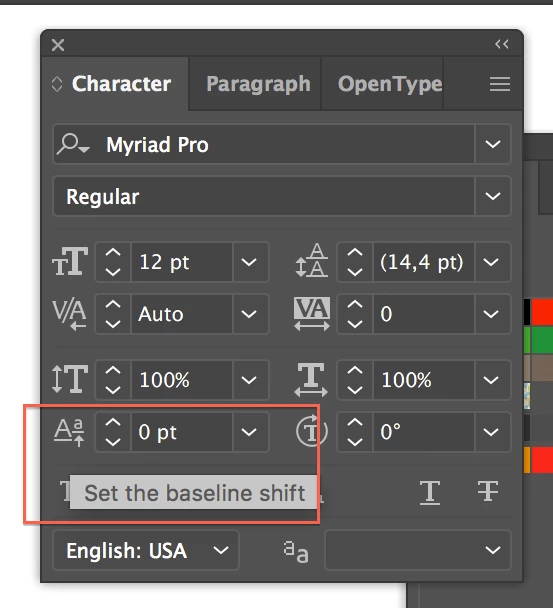
         Wait! I just saw it. I went through my preferences a few minutes ago and switched on all the prefs that could possibly deal with a pop-up label, restarted Illustrator, and tried the mouseover again, and "Baseline Shift" finally popped up, at the expected  location. So its appearance or non-appearance is governed by a preferences choice. When I reset the prefs to my usual choice and restarted AI, it didn't appear. I guess that tells the tale. So somewhere it should be specified that Baseline Shift is not available unless some preference choice (I don't know which one) enables it. Thanks, JET and Monika,  for asking the questions that got us to that conclusion.

    barbara_a7746676
    Community Expert
    Community Expert
    January 12, 2019

    Another technique that might be useful, that does not involve baseline shift . . .

    After creating the type on a path, select it with the black Selection tool.

    Object > Transform > Scale and click Copy.

    Monika Gause
    Community Expert
    Community Expert
    January 12, 2019

    Baseline shift is in the character panel. You have to "Show options" via its panel menu

    January 12, 2019

    Thank you, Monika and JET. I can't say I found it, but I was able to make it work. I must have a damaged install of Illustrator, because the actual term Baseline Shift does not appear anywhere in the toolbox or in my Illustrator Type panel. Your note about mousing over the icons got me to it, though, disguised as the subscript/superscript option in the lower left. It was easy to use, and it worked. Since I rarely use the sub and superscript feature, I wasn't used to dealing with a baseline shift, particularly when that isn't what it's called.   For simplicity, I pasted the illustrator type into a Photoshop doc, and found that, indeed, the feature is called Baseline Shift in the Photoshop type panel. The term appears when the user mouses over the subscript icon, but that doesn't happen in Illustrator, because, in spite of instructions to the contrary, it  isn't there. At least not in my install of Illustrator 23.

    Monika Gause
    Community Expert
    Community Expert
    January 12, 2019

    So you don't see this?

    JETalmage
    Inspiring
    January 12, 2019

    Baseline shift is a character-level setting. It is available in the Character palette. Mouseover the icons and read the tooltips. You can include it in a Character-level Style definition.

    JET