

Eduard Buta
Inspiring
April 7, 2022
Answered

Does a script/extension exist for aligning objects by 'stacking' method?

  • April 7, 2022
  • 5 replies
  • 1336 views

Hello, community.


I was working when I realized there was an issue that kept persisting throughout my workflow. Oftentimes, I am required to align two or more objects by 'stacking' them. For example, aligning the bottom of an object to the top of another. Or the left of an object to the right of another.


This sounds like something which should be available within Illustrator, but I have no knowledge of such a tool already existing. So I was wondering if you guys know of any script or third-party extension that might get the job done?


Ideally, it would be something like a panel (like the current Alignment one) with four options:

  • Align top to bottom.
  • Align bottom to top.
  • Align left to the right side.
  • Align right to the left side.


Looking forward to hearing your thoughts on this!
This topic has been closed for replies.
Correct answer jduncan

A few days after you asked this, I ran into a somewhat similar situation. I had a bunch of placed objects that I needed stacked end to end. Now, as described by CarlosCanto, Distribute Spacing in the Align palette works great, but it distributes the selected objects based on the position of the objects on the artboard, but I needed the order to be based on the actual stacking order of the objects in the layers palette. I could have dragged each object around on the artboard to make sure Illustrator distributed them in the correct order but that would have been no fun at all. Plus, I already had a script that does most of the work so I figured why not.


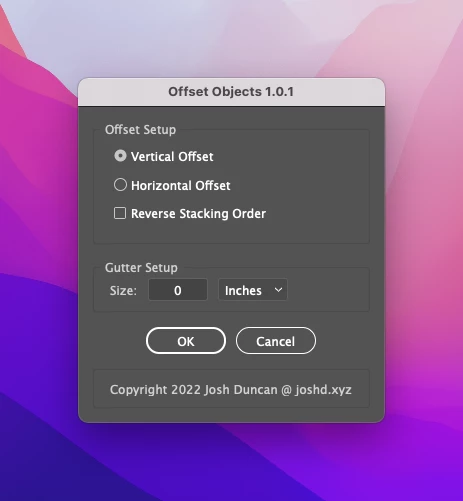
The script is pretty simple. You can choose to offset either vertically (top to bottom => bottom edge to top edge) or horizontally (left to right => right edge to left edge). And as I said above, the offset will be done based on the layers palette stacking order of the selected objects. The top object in the layer stack will be the "key object" that the rest are offset from. If you want to reverse the direction of the offset (bottom edge to top edge, or left edge to right edge), just check the "Reverse Stacking Order" checkbox and everything will flip ("key object" becomes the bottom-most object in the layers palette).


Finally, you can specify a gutter (spacing between objects) if needed in Inches, Points, or mm.


You can download the script on Github at the link below if you would like to give it a try. Cheers!

https://github.com/joshbduncan/adobe-scripts/blob/main/OffsetObjects.jsx


5 replies

jduncan
Community Expert
jduncanCommunity ExpertCorrect answer
Community Expert
April 29, 2022

A few days after you asked this, I ran into a somewhat similar situation. I had a bunch of placed objects that I needed stacked end to end. Now, as described by CarlosCanto, Distribute Spacing in the Align palette works great, but it distributes the selected objects based on the position of the objects on the artboard, but I needed the order to be based on the actual stacking order of the objects in the layers palette. I could have dragged each object around on the artboard to make sure Illustrator distributed them in the correct order but that would have been no fun at all. Plus, I already had a script that does most of the work so I figured why not.


The script is pretty simple. You can choose to offset either vertically (top to bottom => bottom edge to top edge) or horizontally (left to right => right edge to left edge). And as I said above, the offset will be done based on the layers palette stacking order of the selected objects. The top object in the layer stack will be the "key object" that the rest are offset from. If you want to reverse the direction of the offset (bottom edge to top edge, or left edge to right edge), just check the "Reverse Stacking Order" checkbox and everything will flip ("key object" becomes the bottom-most object in the layers palette).


Finally, you can specify a gutter (spacing between objects) if needed in Inches, Points, or mm.


You can download the script on Github at the link below if you would like to give it a try. Cheers!

https://github.com/joshbduncan/adobe-scripts/blob/main/OffsetObjects.jsx


Kurt Gold
Community Expert
Community Expert
April 29, 2022

That's a very good approach, Josh.


Thank you for sharing it here.


jduncan
Community Expert
Community Expert
April 18, 2022

If you are interested in writing your own script, all of the pieces you need are available in my MatchObjects (view here) script. You would just need to code the options you want and use the alignment functions in the script to do the alignment.


Kurt Gold
Community Expert
Community Expert
April 18, 2022

The recommended plugin "Bloks" is a promising approach, no doubt, but as far as I can see it currently has some serious issues to work in the latest (Mac) versions of Illustrator. It does not even appear when trying to open it.


For your rather simple aligning things there are already scripts available. On github you may find them.


Eduard Buta
Inspiring
April 18, 2022

Bloks doesn't work on my Win machine either, so that's a bummer. As to other alignment scripts, I've gone through hundreds of GitHub repositories searching for scripts in the past, and none caught my eye when it comes to this. But I most definitely overlooked some. I'm sure I'll find something in time.

Kurt Gold
Community Expert
Community Expert
April 18, 2022

Eduard,


I just checked it again and saw that there is a default set of aligning scripts included in the beautiful LAScripts plugin, provided by Alexander Ladygin. Those scripts will do exactly what you are going to do. However, you may note that most of them are bound to a library and therefore will not work as stand-alone scripts.


It's a bit tricky to install this plugin, but it is probably the most versatile scripting palette availabe for Illustrator, including the ability, among other things, to modify any script in real time.


Participating Frequently
April 15, 2022

Might be a lot more than you're looking for, but check out Weston Thayer's "Bloks" extension. You can create a vertical or horizontal stack via flexbox that auto-updates if you change the group contents.

Eduard Buta
Inspiring
April 15, 2022

Now that extension looks like a game changer. Thank you very much for sharing!!!

Participating Frequently
April 18, 2022

It has completed changed how I design at scale. The usage is a little tricky (like all flexbox) but once you get the hang of it, you can really tear through some projects. Try it out, and I'd be pleased to hear what you think. Really hope it catches on.

CarlosCanto
Community Expert
Community Expert
April 8, 2022

would this work?


Eduard Buta
Inspiring
April 8, 2022

Hi, Carlos. This is exactly how I've approached this so far, so yea - it definitely works. Was just curious if a dedicated tool was created for this purpose in the past. Thanks for sharing, as I now realize my ask may be an overkill when such a relatively simple 'hack' exists.