kphotopage
kphotopageCorrect answer
Legend
March 5, 2025

For turning a photo or text into a Halftone tone pattern, vector dots. Many ways.

Ton gave you one way.


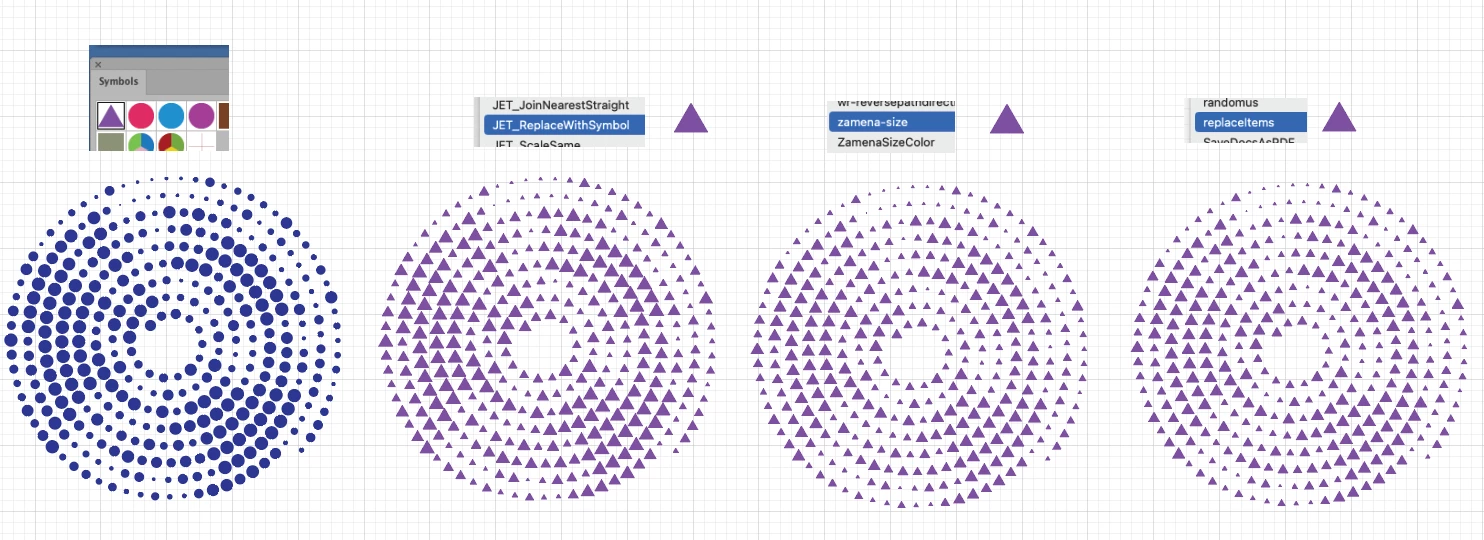
Fast forward….., now you want to turn the various size dots (Circles) into triangles.  

Scripts is definitely the way to go.

I first created a Symbol.


Here I tested 3 scripts.

All worked

Special thank you and praise to Illustrator Script writers.


K

3 replies

kphotopage
kphotopageCorrect answer
Legend
March 5, 2025

For turning a photo or text into a Halftone tone pattern, vector dots. Many ways.

Ton gave you one way.


Fast forward….., now you want to turn the various size dots (Circles) into triangles.  

Scripts is definitely the way to go.

I first created a Symbol.


Here I tested 3 scripts.

All worked

Special thank you and praise to Illustrator Script writers.


K

Translate
Ton Frederiks
Community Expert
Community Expert
March 4, 2025

If you want to have text with this triangle shape, first create dots, Expand Appearance and Image Trace them:

Ungroup the dots, create a triangle and then use a replacement script, like Monika suggested or this one:

Replace items script:
https://github.com/alexander-ladygin/illustrator-scripts/blob/master/replaceItems.jsx

Translate
Monika Gause
Community Expert
Community Expert
March 4, 2025

Easiest would be to use the plugin Phantasm (not for free)

But using scripts you can do it with other shapes as well: https://youtu.be/IwOMpdO_5Mk

This makes squares. In order to do rectangles you would need the FindReplace script by Nathaniel Kelso.

Translate