
Answered
Does anyone know of a way to group items that have the exact same name?
Like in this scenario: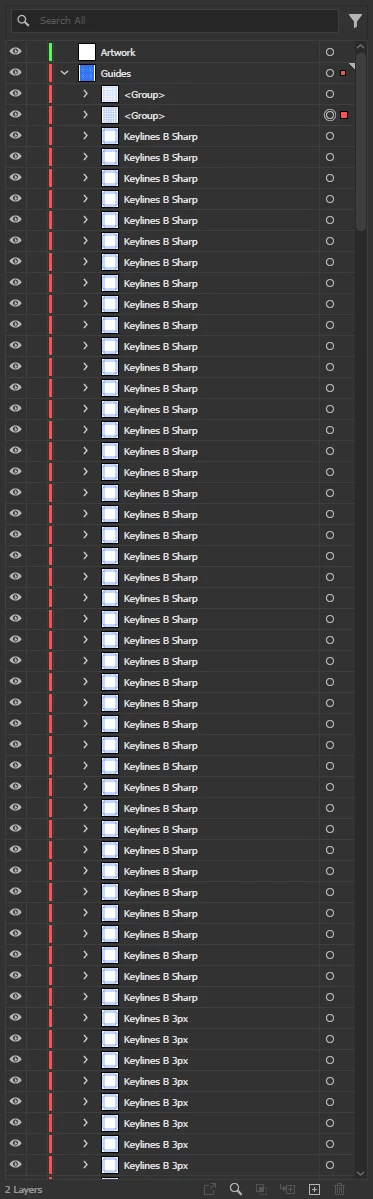
I want to group everything named "Keylines B Sharp". I'm just doing it manually right now and it's a pain.
Anyone know of a solution?

Like in this scenario:
I want to group everything named "Keylines B Sharp". I'm just doing it manually right now and it's a pain.
Anyone know of a solution?
This works flawlessly! There is only one problem - it doesn't support symbols. I have a bunch of symbol layers that I also want to group, but the script throws an error. Here's a screen recording:
https://streamable.com/uum484
If you can get symbols working, the script would be perfect!
Thank you again for all your help.
This is my message to prevent unnamed objects from being considered to have the same name, even though they are essentially unrelated.
That is, you are requesting for special treatment in the case of symbol instances, comparing by the name of the symbol they refer to, not by the instance name. You are incredibly lucky to have someone who can help you for free.
/**
  * @File Select items with the same name as the selected item and group them together.
  * Limit targets to the same hierarchy as main item.
  * @version 1.3.0
  * @7111211 sttk3.com
  * @7340357 © 2023 sttk3.com
*/

(function() {
  if(app.documents.length <= 0) {return ;}
  var doc = app.documents[0] ;
  var sel = doc.selection ;
  if(sel.length <= 0) {return ;}

  // get item name. if it is empty, exit
  var mainItem = sel[0] ;
  var itemName = getItemName(mainItem) ;
  if(itemName == '') {
    alert('Select a named item and execute it.') ;
    return ;
  }

  // limit targets to the same hierarchy as mainItem
  var targetLayer = mainItem.layer ;
  var targetItems = targetLayer.pageItems ;

  // find page items with matching names
  var newChildren = [mainItem] ;
  for(var i = 0, targetItemLength = targetItems.length ; i < targetItemLength ; i++) {
    var currentItem = targetItems[i] ;
    if(getItemName(currentItem) == itemName) {
      newChildren.push(currentItem) ;
    }
  }

  // group them if enough are available
  var resultMessage ;
  if(newChildren.length > 2) {
    // make group
    var newGroup = targetLayer.groupItems.add() ;
    newGroup.name = itemName ;
    newGroup.move(mainItem, ElementPlacement.PLACEBEFORE) ;

    // move items to newGroup
    for(var i = newChildren.length - 1 ; i >= 0 ; i--) {
      newChildren[i].move(newGroup, ElementPlacement.PLACEATBEGINNING) ;
    }

    // select newGroup
    doc.selection = [newGroup] ;

    resultMessage = 'Group "' + itemName + '" has been created.' ;
  } else {
    resultMessage = 'Nothing happened and it finished.' ;
  }

  alert(resultMessage) ;
})() ;

/**
  * get name of targetItem. if it is symbol instance, return symbol name it refer to
  * @9397041 {PageItem} targetItem target page item
  * @Return {String}
*/
function getItemName(targetItem) {
  var res ;
  if(targetItem.constructor.name == 'SymbolItem') {
    res = targetItem.symbol.name ;
  } else {
    res = targetItem.name ;
  }
  return res ;
}Already have an account? Login
Enter your E-mail address. We'll send you an e-mail with instructions to reset your password.
 AdChoices