kellyjaye1
Known Participant
May 15, 2009
Answered

Does Illustrator have a Gradient Feather tool like InDesign?

  • May 15, 2009
  • 3 replies
  • 67617 views

CS4...I know it has to be here somewhere, I know the gradient tool in In InDesign but cant find one in Illustrator.  I see the normal feather but it seems to just feather the edges.  I need it to start full on one end and fade out to the other end

    Correct answer Scott Falkner

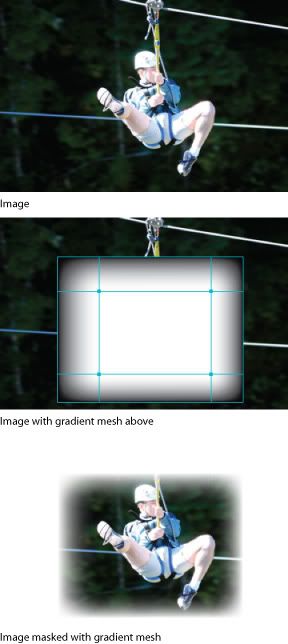
    Illustrator can feather transparency just as well as InDesign. Better, in fact. But the interface for doing so is convoluted and has long been one of the most asked questions on the forum. Look up Opacity Mask in the help files. Basically, you first create a gradient, gradient mesh, or a number of objects with different grayscale fills, which are then grouped. This object or group is placed above the object, image, or group to be masked and you Make Opacity Mask in the Transparency panel.

    3 replies

    kjschskjdcskdjc
    Participant
    June 10, 2021

    Like most things in Illustrator, you have to do 2-3 steps, vs InDesign where you can do it in 1 step (natively).
    When I have to work in Illustrator, I typically just do the gradation in PS, then bring it into AI as a PNG.

    Scott Falkner
    Community Expert
    Scott FalknerCommunity ExpertCorrect answer
    Community Expert
    May 15, 2009

    Illustrator can feather transparency just as well as InDesign. Better, in fact. But the interface for doing so is convoluted and has long been one of the most asked questions on the forum. Look up Opacity Mask in the help files. Basically, you first create a gradient, gradient mesh, or a number of objects with different grayscale fills, which are then grouped. This object or group is placed above the object, image, or group to be masked and you Make Opacity Mask in the Transparency panel.

    Inspiring
    May 15, 2009

    Just a followup to Scott's answer - If you use 100|100|100|100 for your masking black, as opposed to 0|0|0|100, it will fade all the way to transparent.

    KarenSC
    Inspiring
    May 15, 2009

    The gradient tool can be found under Window/Gradient in Illustrator.

    In version CS4 you can choose the colour on the gradient and make the opacity value 0 which will fade to nothing and be transparent.

    Is that what you are trying to do?

    WWW_ODCREATIVE_NET
    Participant
    February 3, 2016

    Maithú Karen