

dublove
Legend
September 14, 2024
Pregunta

Does Illustrator have the ability to copy and flip at the same time?

  • September 14, 2024
  • 2 respuestas
  • 796 visualizaciones

Does Illustrator have the ability to copy and flip at the same time?

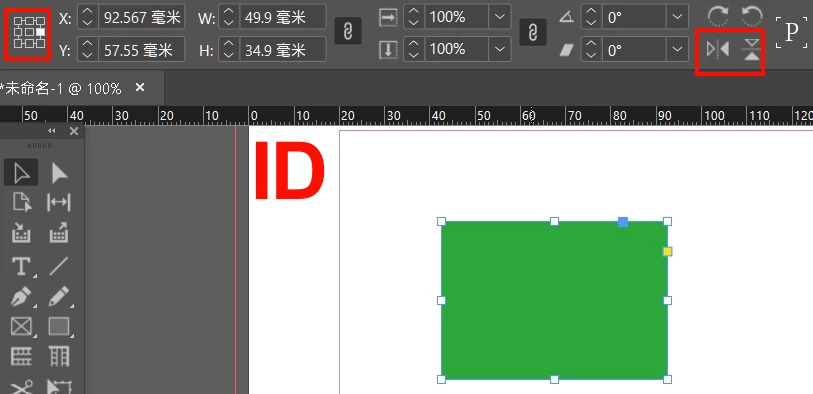
It's a very important and simple feature in Indesign.

In ID, you can simply hold down Alt and click the flip button again.


But in AI, you need to do it in two steps and it's a pain.

You must first copy and then perform a flip.
And you have to select the drop down menu, not the direct clickable.


It's hard to understand why some of Adobe's software doesn't borrow from each other and unify.
Are they really irrelevant and unappreciative of each other?

For example, ID's shortcuts are very freely defined, but PS and AI are too restrictive and inconvenient.
 

Este tema ha sido cerrado para respuestas.

2 respuestas

creative explorer
Community Expert
Community Expert
September 16, 2024

@dublove have you tried the 'Reflect tool' and you can copy it too. Double click on the reflect tool to get the pop-up box to open:


m
Monika Gause
Community Expert
Community Expert
September 16, 2024

That's what Ton described.

dublove
dubloveAutor
Legend
September 16, 2024

Saw it, thanks.
Don't understand why Adobe didn't add it to the control bar above.
And ai doesn't seem to pay much attention to the use of the nine-panel grid.

Ton Frederiks
Community Expert
Community Expert
September 14, 2024

Select the object

Select the Reflect tool (O)

Click to set transformation point.

Start dragging to reflect, then hold down Alt for copy

dublove
dubloveAutor
Legend
September 16, 2024

Not very scientific.

Ton Frederiks
Community Expert
Community Expert
September 16, 2024

But it works.

You can also Alt click to set the transformation point to get the scientific option.