lenat91
Participating Frequently
April 30, 2019
Answered

Dotted line appears in final image file (Photoshop, png, and jpeg)

  • April 30, 2019
  • 2 replies
  • 2609 views

Hi all,

I have a logo file that was created with Illustrator CC 23 on Windows. There are several color variants for the logo, and each one was created the same way, including the solid white one:
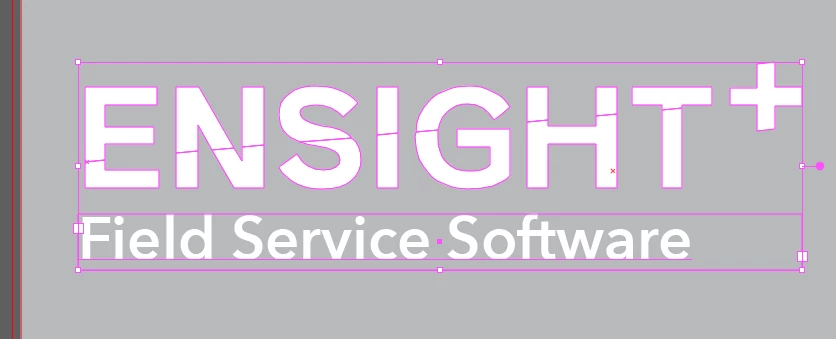
As you can see here, there are two separate layers for the top and bottom halves of the text in "EnSight". When the logo is placed in Photoshop as a Smart Object, there is a dotted gray line that appears where the separation in the groups would have been:

With the other color variants, this isn't a problem since the colors seem to cover up any separation areas. For the white version, I "solved" the problem by basically just painting over the line in Photoshop, then saving that as the final format (png and jpeg). Is there a way to avoid this problem in the first place from the Illustrator file? The original designer for this never answered that question, and so every time I've needed to use the AI file for any reason when in PS I have to use the brush to correct that.

Thank you!

-LT

This topic has been closed for replies.
Correct answer meganchi

On the white logo, select the ENSIGHT word, then use pathfinder, unite.

2 replies

S_Gans
Community Expert
Community Expert
April 30, 2019

Would it be possible to show your layers? It LOOKS like, since the text appears editable, that there may be a layer above the text that's maybe outlines? If so, there may be an issue with how it's created. May be a stroke, may be a clipping mask... It would really help to see more of the detail of the file.

Adobe Community Expert / Adobe Certified Instructor
lenat91
lenat91Author
Participating Frequently
April 30, 2019

Hi S_Gans,

Here's a more detailed view:

meganchi
meganchiCorrect answer
Legend
April 30, 2019

On the white logo, select the ENSIGHT word, then use pathfinder, unite.

Monika Gause
Community Expert
Community Expert
April 30, 2019

The only solution would be to not have a sliced version for this case..

You could try and export it with Anti-aliasing set to super-sampling, but that's about it.