Participating Frequently
March 9, 2021
Answered

Drag a curve without changing the handle directions

  • March 9, 2021
  • 1 reply
  • 2339 views

I haven't used Illustrator for a very long time, and things have really changed!

You used to be able to drag a curve without it affecting the direction of the bézier handles, only the distance. I know there is a button in Photoshop that does it called "Use Legacy Path Segment Dragging". Is there anything like that in Illustrator?

Thanks for helping an old-timer out!😂

This topic has been closed for replies.
Correct answer carlosgarro

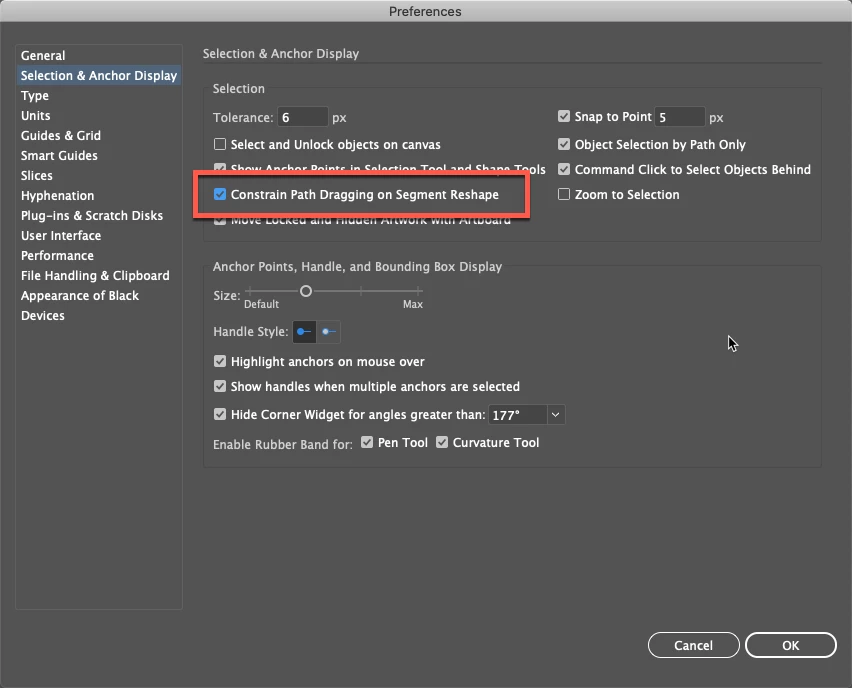
Maybe this option?


1 reply

Monika Gause
Community Expert
Community Expert
March 9, 2021

It's in Preferences >Selection & anchor point

Don't know how the setting is called in English, but you should find it in the upper section of that dialog.

carlosgarro
Community Expert
carlosgarroCommunity ExpertCorrect answer
Community Expert
March 9, 2021

Maybe this option?


Community Expert
March 10, 2021

Yeah, that's the setting. One thing that doesn't seem to be included in Illustrator's Pen tool is the abilility to manually adjust the length of one direction handle of a smooth anchor point without affecting the angle. If you have a smooth point set with direction handles on a 0, 45 or 90 degree angle the angle can be constained by toggling the shift key. If the direction handles are set at an odd angle there appears to be no way how to maintain that angle while manually adjusting one of the handles.

Astute Graphics' Inkscribe tool does allow this behavior; you toggle the Alt key (Windows) to manually adjust the length of one direction handle of a smooth point without affecting the opposing direction handle or changing the existing angle.