campagnoli
Participating Frequently
January 13, 2026
Answered

Drag a selected object to a particular layer.

  • January 13, 2026
  • 2 replies
  • 88 views

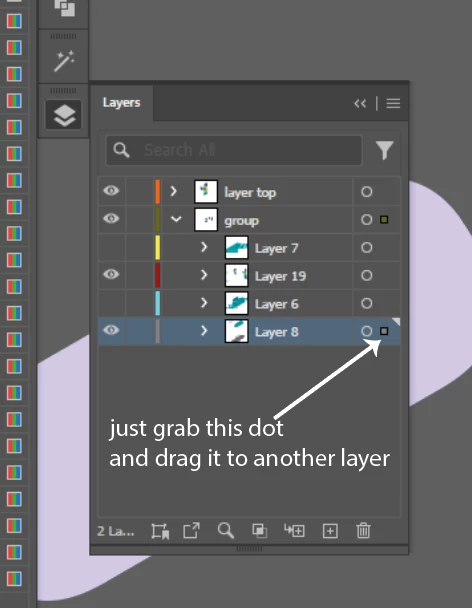
Maybe is too obvious, but I'm missing to reorder a element, by dragging it to a particular layer, or group of layers in the panel.

Correct answer Ton Frederiks

Grab the dot that indicates the selection and drag it to another place.

Screenshot 2026-01-13 at 15.31.08.png

2 replies

Abhishek Rao
Community Manager
Community Manager
January 13, 2026

Hi @campagnoli,


Thanks for reaching out. To move a selected object to a specific layer or sublayer, you can drag the small colored square that appears next to the selected object in the Layers panel and drop it onto the target circle of the layer you want. For more details, you can also refer this helpx here: https://adobe.ly/4jE14H7 and a sample video: (2313) Moody Floral | Turn Your TV Into Art | Vintage Art Slideshow For Your TV | 1Hr of 4K HD Paintings - YouTube.


Please give this a try and let us know if it works for you.

Abhishek

Ton Frederiks
Community Expert
Ton FrederiksCommunity ExpertCorrect answer
Community Expert
January 13, 2026

Grab the dot that indicates the selection and drag it to another place.

Screenshot 2026-01-13 at 15.31.08.png