Participant
February 2, 2018
Answered

Dragged seamless pattern into swatch but its not filling properly

  • February 2, 2018
  • 2 replies
  • 1972 views

Hi,

Please bear with me as I am an AI novice! I have downloaded a seamless glitter pattern (vector) and would like to use it as a font fill. I have dragged it into my swatches but when I use it to fill there are strips missing?
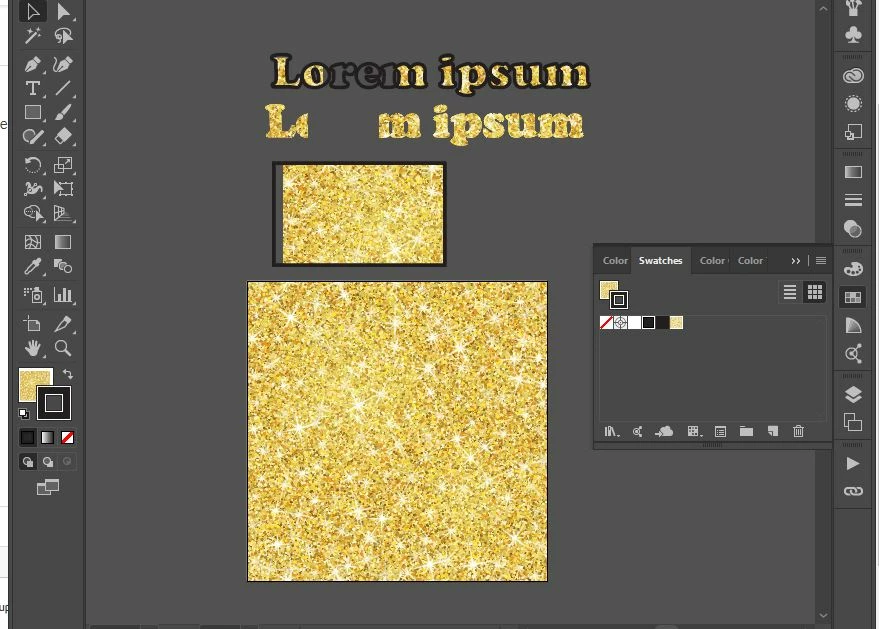
Am I just being naive to think it is that simple or should I do something before I drag it into my swatches? The bottom square is what has downloaded, the top square and 2 x fonts are the result of the fill.

Any help would be much appreciated!
    This topic has been closed for replies.
    Correct answer Ray Yorkshire

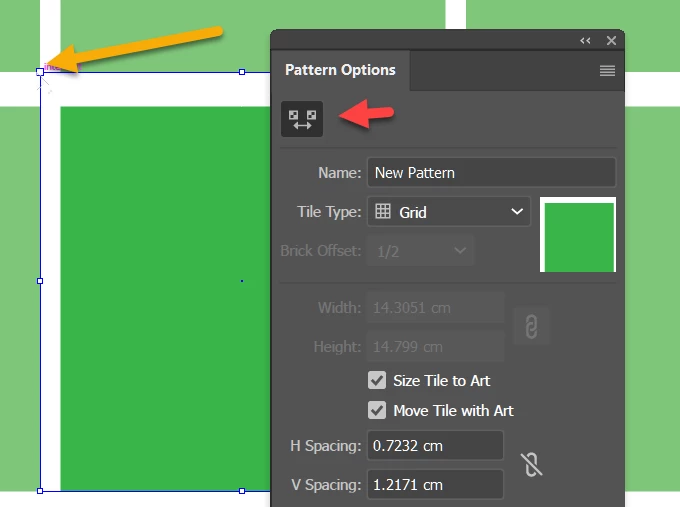
    Pattern might just need tightening up ?

    In the Swatches Panel double click on the swatch to open the pattern options panel

    Use the Pattern Tile Tool pointed to by red arrow, to adjust the control points- eg orange arrow

    Like here i'll move the point inwards to remove the white gaps

    2 replies

    Srishti_Bali
    Legend
    February 8, 2018

    Hi there,

    I would like to know if the steps suggested above worked for you, or the issue still persists.

    Kindly update the discussion if you need further assistance with it.

    Thanks,

    Srishti

    Ray Yorkshire
    Ray YorkshireCorrect answer
    Participating Frequently
    February 2, 2018

    Pattern might just need tightening up ?

    In the Swatches Panel double click on the swatch to open the pattern options panel

    Use the Pattern Tile Tool pointed to by red arrow, to adjust the control points- eg orange arrow

    Like here i'll move the point inwards to remove the white gaps

    Participant
    February 22, 2018

    Brilliant - that fixed it!

    Thanks