Inspiring
August 22, 2018
Question

Draw a multi faceted rectangularish object

  • August 22, 2018
  • 5 replies
  • 801 views

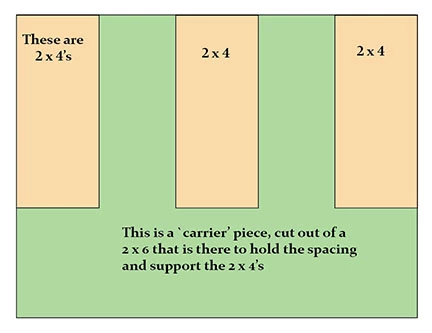
The included image is supposed to represent an `end' view of three 2 by 4s with a piece at

each end cut to hold the spacing and support the 2 by 4s. A sort of `carrier' piece

I drew it in sort of a phony way:  Created the green rectangle obect (the carrier piece), then created

3 more rectangle objects (the tan 2 by 4s)  and placed them on top of the `carrier piece', spaced them

out and called it good.

My question is how to draw the carrier piece without the 2 by 4s.  That is, draw the entire carrier piece

with the cutouts that will hold the 2 by 4s in a view before the 2 by 4s are added.

I realize it is bound to take a bit more time and effort, but looking for a way to do it that is at least somewhat

comparable to the phony way I used here.  Some way that eases the time and effort needed to make erasures

or isolating and deleting line segments.
    This topic has been closed for replies.

    5 replies

    Inspiring
    August 23, 2018

    Thank you all for the great input.  That `Minus front' tool is really nifty

    I will mention the instructions from Barbara Ash failed to give a clean result.  I suspect due to my blundering around

    when creating the original drawing. Maybe from dinking around with the sizing of the 2x4s repeatedly and not really her

    instructions, however the other instructions by Les O, with the extra steps he advocated, leaves a clean result even with

    whatever blundering I may have done in original drawing. ... At any rate, following Barbara A's directions leaves the results

    shown in the screengrab below:

    \

    barbara_a7746676
    Community Expert
    Community Expert
    August 23, 2018

    For the instructions to work cleanly, the objects must either touch the edge or go past the edge (sorry I didn't make that clear). It is easier to make them go past the edge, as shown below, before using Minus Front. You can subtract all three objects at once if they are grouped, as I mentioned in the instructions.

    Inspiring
    August 23, 2018

    You don't need to group them Barbara, just select all 4 objects and hit minus front

    Monika Gause
    Community Expert
    Community Expert
    August 22, 2018

    Set up a document grid and draw with the pen tool. It's just a series of clicks.

    tromboniator
    Community Expert
    Community Expert
    August 22, 2018

    Not possible with a 2 × 6. You'll have to go with a 2 × 10.

    barbara_a7746676
    Community Expert
    Community Expert
    August 22, 2018

    This will give you the general idea.

    Delete the text.

    Select the 3 wood pieces and Object > Group.

    Select everything and Pathfinder > Minus Front.

    You end up with this.

    If you want to go a step further and add a dimensional look, you can use Effects > 3D > Extrude & Bevel.

    Inspiring
    August 22, 2018

    First make a copy of everything. Then make the two end 4 x 2's extend outside the green carrier i.e left one drag top left corner diagonally upwards to the left, right one drg top right corner upwards to the right, middle one just drag the top side up a little. Then select all and hit the 'minus front' button in the pathfinder panel (top row second from left)