



Tom_Krcha
Community Manager
Community Manager
March 21, 2013
Question

Drawscript - turn Illustrator shapes into code

  • March 21, 2013
  • 18 replies
  • 24562 views

I've just launched a little extension for Illustrator I've been working on called Drawscript - http://drawscri.pt

It converts Illustrator shapes into code (Obj-C, C++, JavaScript, Processing, ActionScript 3, JSON, Bezier array).
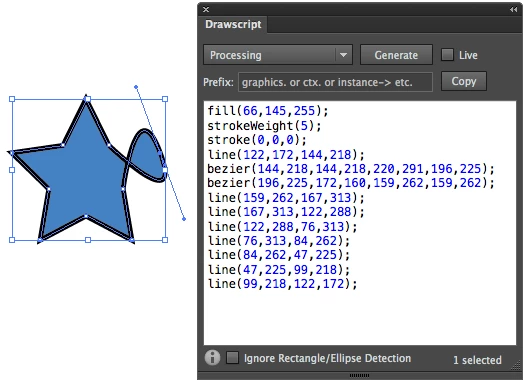
It's great for skinning UIs, creating vector assets for gaming and learning/teaching vector graphics programming.

If you have any comments, found bugs, etc. Let me know here or on my Twitter, Facebook, Google+.

Thanks!

Tom

This topic has been closed for replies.

18 replies

Participant
March 18, 2016

The link to the download page is not working. Is there any way how can I get this extension? Tanks!

Monika Gause
Community Expert
Community Expert
March 18, 2016
Participant
March 18, 2016

Hi Monika

Thank you very much for your reply. I have try to install this extension but all I get is empty extension panel. Any idea what to do?

Many Thanks

Ondrej

Participant
July 29, 2015

Really interested in trying and if possible participating in improving this extension.

Unfortunately it cannot be installed on Illustrator CC 2015.

Possible to get it at least to install or better get the source so I can patch and make it works ?

Thanks in advance

sophophilia_studios
Participant
July 8, 2015
Hey guys,
Does anyone know Is there a way to output the anchor coordinates like [x1,y2],[x2,y2] instead of x1,y1,x2,y2.
I looked into the code, but I am not very versed in Java. I think I found what I needed to change but after I recompiled the .zxp I could not install it. It said that the signature was invalid.

Any help will be much appreciated! Thanks!
Participant
September 22, 2014

Will this be updated for illustrator 18.0.0 on CC? When I try to install to Extensions Manager I get a return: "This extension can not be installed, it requires Illustrator version in range of inclusively between 16.0 and 17.9."

Participant
December 1, 2013

As adrock42 says, the Processing conversion should be using the beginShape, endShape and vertex format rather than just lines. Lines won't accept a fill color and aren't grouped into objects.

e.g.

fill(247,170,243,80);
beginShape();
vertex(84,317);
vertex(105,290);
vertex(90,269);
vertex(110,306);
vertex(97,261);
vertex(155,275);
vertex(84,317);
endShape();
Participant
November 4, 2013

The processing code is much cleaner then the bezier editor tool inside processing. but I have fond it better to use C++ OpenFrameworks Shape becasue that takes shapes in to account.  The processing mode creates lines which are unfillable as objects.  C++ OpenFrameworks Shapes creates a shape using ofBeginShape, ofEndShape, ofVertex, which just need to be converted to beginShape, endShape, and vertex

Participant
October 25, 2013

Has anyone written a transformation in javascript to convert Drawscript's JSON into EaselJS's graphics code?

Inspiring
October 14, 2013

This is awesome! Any chance of a port to the Corona sdk? In the past they have focused on bitmap but have recently released Graphics.2.0 which now includes newPolygon with fill options plus stroke and shape functions. Take a look at this about newPolygon.

http://docs.coronalabs.com/tachyon/api/library/display/newPolygon.html

I would be most willing to pay for a Corona ready version of Drawscript.

Keep up the good work.

Participant
April 24, 2015

I would love to have something like this for corona sdk. Any updates on this?

Participant
October 13, 2013

I LOVE this extension.

Is there any way to change the origin tho? Even when I adjust the origin with the ruler, the numbers come out relative the entire file. I have to export the paths to another file to get them to start at 0,0.

Participant
June 7, 2013

hi

when I export from Illustrator to json format the coordinate x and y lose decimals, is it a bug ?

if no ,  are there  another properties to setup when export ?

thanks