



AngeloMC
Participating Frequently
April 16, 2026
Question

Drop Shadow Appears Larger with Negative Offset Despite Identical Settings

  • April 16, 2026
  • 4 replies
  • 31 views

This is really strange (and a problem when working with packages).
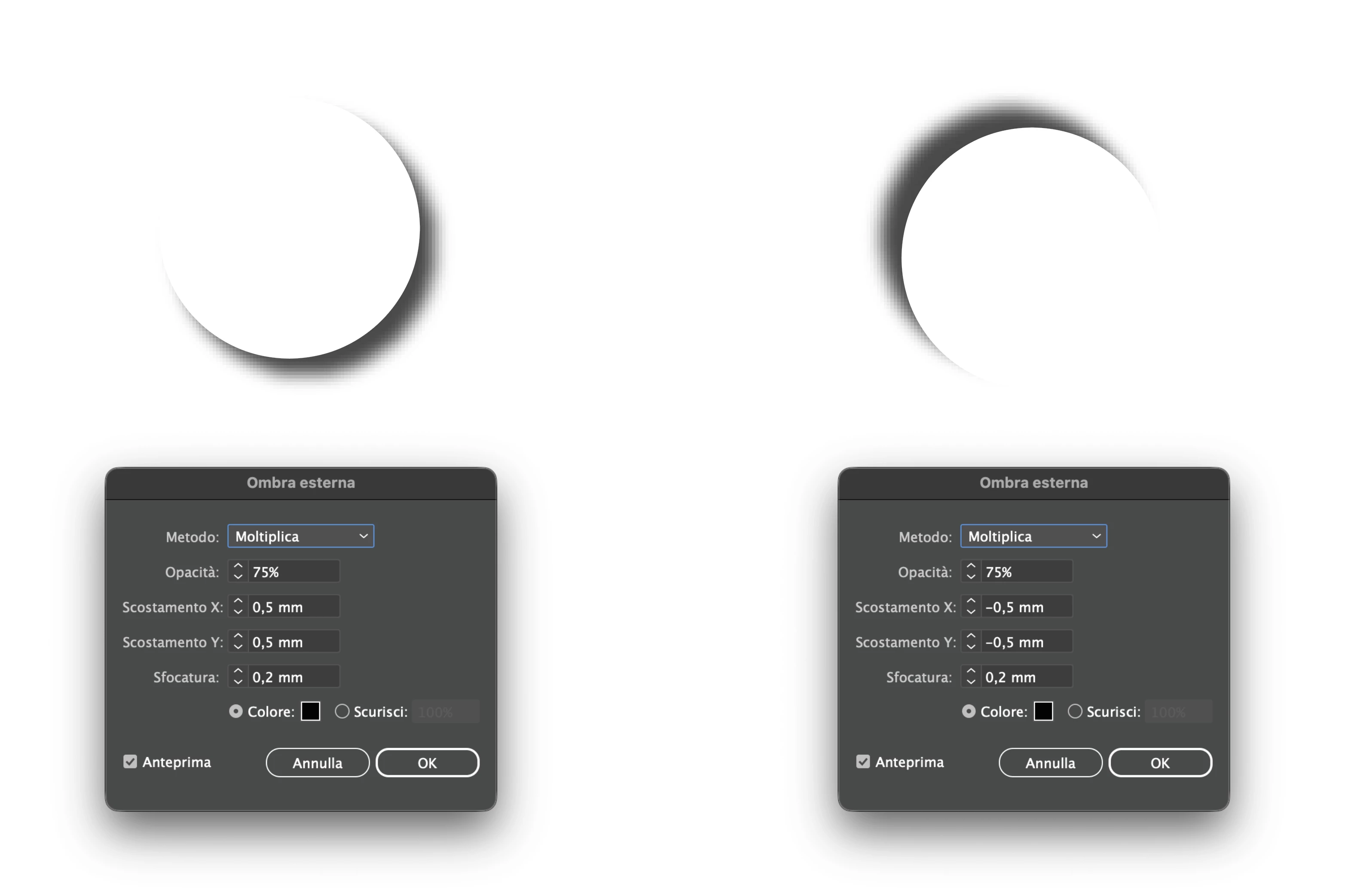
The same shadow effect applied with the same parameters produces two different results.
How is this possible? Are we doing something wrong? See the attached image.
 

    4 replies

    Ton Frederiks
    Community Expert
    Community Expert
    April 16, 2026

    At 100% zoom I cannot see a difference and after expanding the appearance the drop shadows are exactly the same size.


    AngeloMC
    AngeloMCAuthor
    Participating Frequently
    April 16, 2026

    Perhaps it’s me, but I see the right shadow slightly bigger than the left one looking at the white circles! :) But I didn’t try to expand the appearance, I’ll do, thanks.

    Ton Frederiks
    Community Expert
    Community Expert
    April 16, 2026

    What is the zoomfactor of your objects? 

    AngeloMC
    AngeloMCAuthor
    Participating Frequently
    April 16, 2026

    100%, but it doesn’t matter, it occurs with any value as long as blur is more than 0 (the bigger the blur is, the worse is the problem).

    Abhishek Rao
    Community Manager
    Community Manager
    April 16, 2026

    Hi ​@AngeloMC,


    Thanks for sharing the file and explaining the scenario clearly, that helps a lot.

    Could you please open the Appearance panel by going to Window menu > Appearance and check how many times the Drop Shadow effect is listed for each object? It can sometimes happen that the effect gets applied more than once on an object, which can make the shadow look heavier or larger even if the values appear the same.

    If you notice multiple instances of Drop Shadow on one of the objects, try removing the extra one and see if both sides start looking consistent.


    Let me know what you observe after checking this, and I’ll be happy to take it further with you.

    Abhishek

    AngeloMC
    AngeloMCAuthor
    Participating Frequently
    April 16, 2026

    Hi, and thank you for your reply.
    Yes, you’re right, but I used the same object and replaced the drop shadow parameter to avoid such common mistake (it happened in the past! 😅).
    however this is not the case, in attachment you can find a simple demo file to check.
    Thanks again.

    Ton Frederiks
    Community Expert
    Community Expert
    April 16, 2026

    One has a + and one has a -0,5 mm

    AngeloMC
    AngeloMCAuthor
    Participating Frequently
    April 16, 2026

    Of course! One should be in the opposite direction of the other, one is on the front of the pack and the other on the side. The question is why -0.5 produces a different result (bigger shadow) than +0.5… they should be the same size, only on different direction. Hope now it’s clearer, sorry, I missed the explanation. Also, I use Illustrator 2026 for Mac, latest version as today. Thank you for the reply.

    Doug A Roberts
    Community Expert
    Community Expert
    April 16, 2026

    Can you share a demo file? I can’t reproduce in 29.3