
Participant
October 23, 2023
Question

Drop shadow issue

  • October 23, 2023
  • 2 replies
  • 320 views

Hello everyone,


I am currently experiencing an issue with Adobe Illustrator. When I try to add a drop shadow to an object through the aesthetic effects menu, I notice that the "Drop Shadow" option is missing. I've attached a screenshot to illustrate the problem. I've tried searching for this option in various sections of the "Effect" menu, but to no avail.
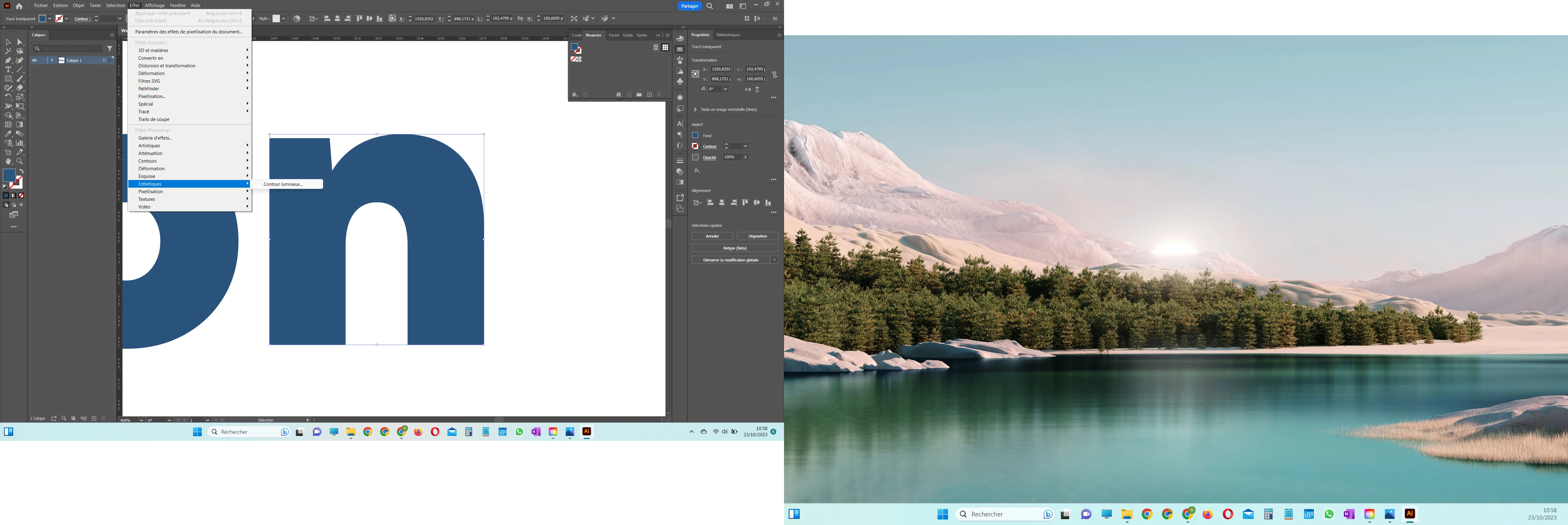


I have already tried the following solutions without success:

  • Checked for updates to ensure I'm using the latest version of Illustrator.
  • Reset Illustrator preferences.
  • Reinstalled the software.

Thanks in advance for your help !

This topic has been closed for replies.

2 replies

Monika Gause
Community Expert
Community Expert
October 23, 2023

There are 2 Stylize sub menus. YOu have to look in the one in the upper part of the menu in the Illustrator effects.

jane-e
Community Expert
Community Expert
October 23, 2023

@rémi33100260xd28 


I've moved your post from Using the Community to Illustrator.


Is the object selected with your Selection tool (black arrow)? Can you expand you Layers panel so we can see what you have?

https://helpx.adobe.com/illustrator/using/drop-shadows-glows-feathering.html


Jane