
Ann2018
Participating Frequently
October 23, 2019
Answered

Drop shadow issue in Illustrator is a blob

  • October 23, 2019
  • 3 replies
  • 4239 views

My drop shadow, no matter what the settings or text or shape, it comes out as a massive blob. Some say check or unchack the CPU settings in "view" but mine is not checked and it is grayed out. I have the latest update for adobe and windows 10. My subscription is due but I can still use illustrator. Could Adobe be keeping my program as hostage bata? How to fix?

    This topic has been closed for replies.
    Correct answer Sebastian Bleak

    As Toughmedia said, "No" your Ai is not being held hostage, you should try to do a test print to see how the drop shadow will really look and please post a screen shot so we can see what you're results are.


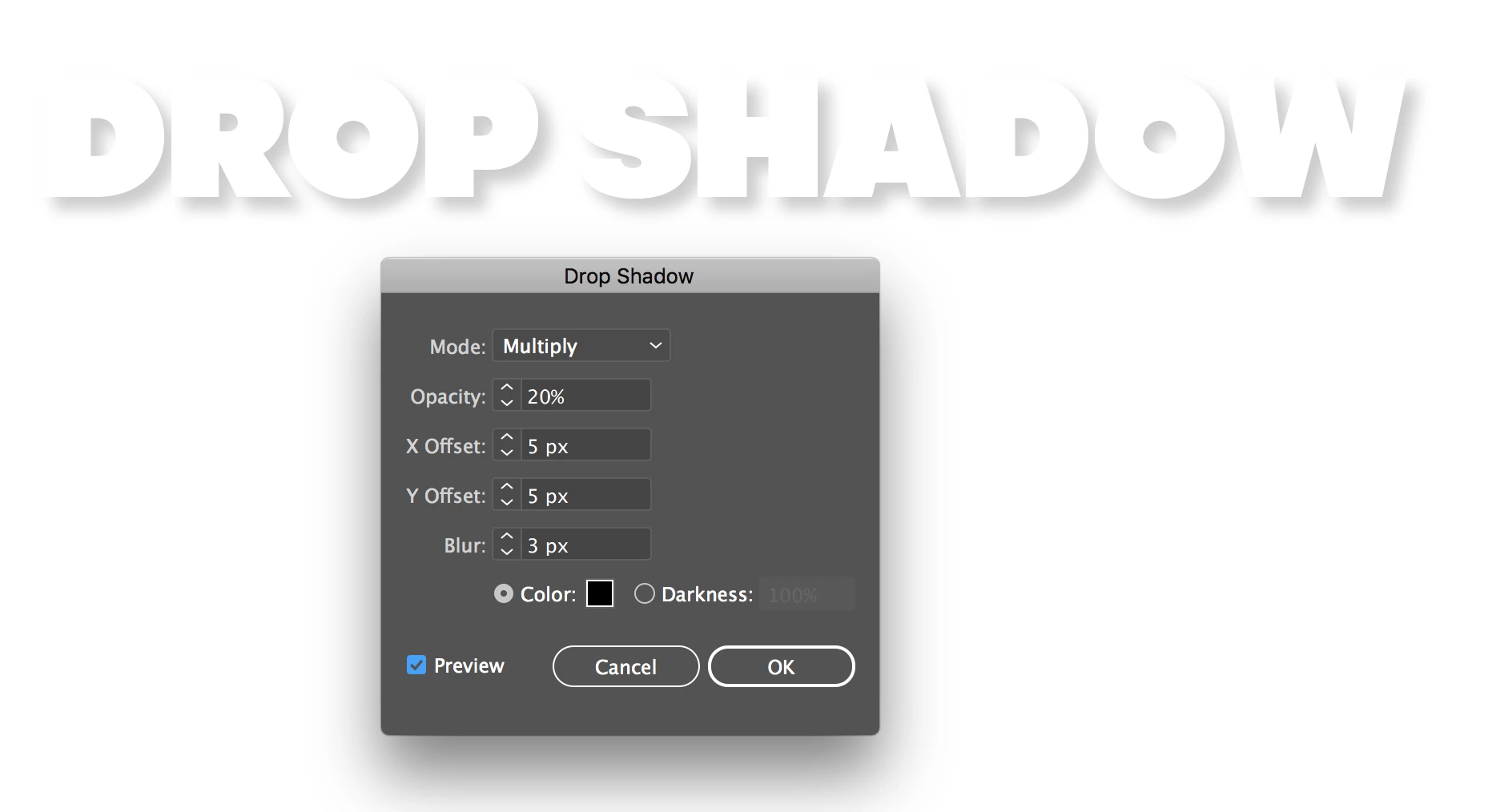
    Are you using smaller units like pixels to make your adjustments? If you have it set to inches, your drop shadow changes will be more dramatic. Here's some screenshots to show you what I mean:

    Notice I'm using pixels to create a subtle effect. Hope this helps! 😃 

    3 replies

    Ann2018
    Ann2018Author
    Participating Frequently
    October 23, 2019

    It just started today and I've used AI CC for 2 years on this computer- never an issue. Yes it prints and saves as a blob too. Here is a screenshot. Again, it doesn't mater if I do it on a shape or letters. Never happened before.


    Ann2018
    Ann2018Author
    Participating Frequently
    October 23, 2019

    I'm not using pixels view and page artboard is set in inches.

    Ann2018
    Ann2018Author
    Participating Frequently
    October 23, 2019

    Sebastian Bleak
    Community Expert
    Sebastian BleakCommunity ExpertCorrect answer
    Community Expert
    October 23, 2019

    As Toughmedia said, "No" your Ai is not being held hostage, you should try to do a test print to see how the drop shadow will really look and please post a screen shot so we can see what you're results are.


    Are you using smaller units like pixels to make your adjustments? If you have it set to inches, your drop shadow changes will be more dramatic. Here's some screenshots to show you what I mean:

    Notice I'm using pixels to create a subtle effect. Hope this helps! 😃 

    Ann2018
    Ann2018Author
    Participating Frequently
    October 23, 2019

    Sebastian, // or anyone else who knows// How do I change my drop shadow units to px instead of in" without changing all my other units? Will px be more detailed incriments than in? 

    Joely10623436
    Community Expert
    Community Expert
    October 23, 2019
    • Could Adobe be keeping my program as hostage bata?

    ???? the answer is no!

    I guess your computer has no compatible GPU to work seamless with AI. Did you check the Preferences (ctrl+K)?

    Does it also print out as a «massive Blob»?

    Could you please show us screenshots of the effect and of the grayed out menue?