Participant
February 3, 2018
Answered

Drop Shadow not showing properly on artboard

  • February 3, 2018
  • 2 replies
  • 5317 views

Hi there,

For some reason when I am working on a file and add a drop shadow to an item it's not appearing properly in the file.  but When i save it as a pdf or export as jpg or png for example, it renders fine.

The biggest problem is this makes it extremely difficult to judge how the final product will turn out without constantly exporting it.

Anyone know how to fix this?  Picture for reference below.

    This topic has been closed for replies.
    Correct answer Omar.Fathy

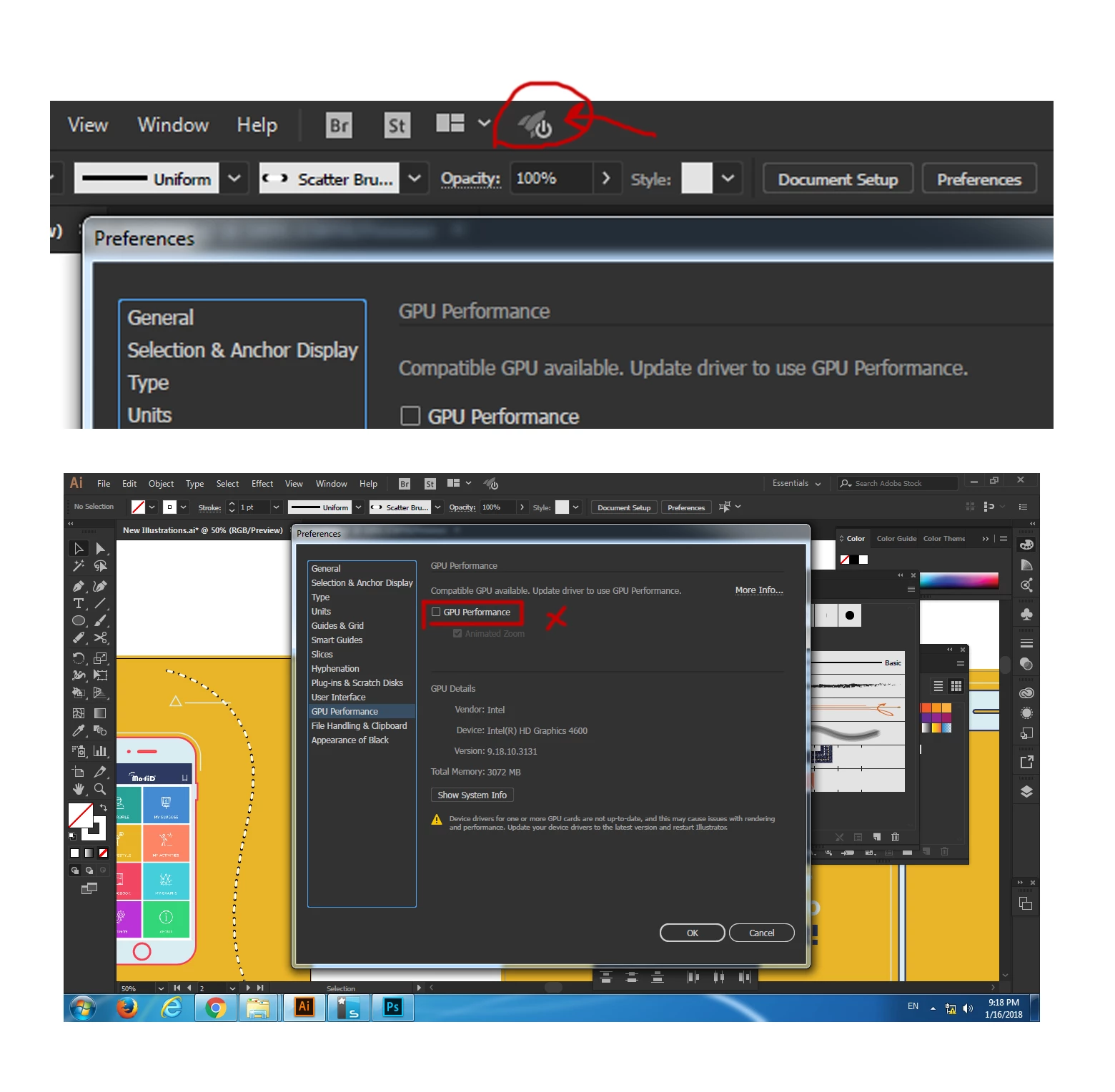
    As Anna said you can check your preview and if GPU Preview is enabled, Disable it and everything will be ok.

    Disable GPU Performance and it will be good:

    1- Click the rocket icon above.

    2- Remove the check mark in GPU Performance.

    2 replies

    Omar.Fathy
    Community Expert
    Omar.FathyCommunity ExpertCorrect answer
    Community Expert
    February 3, 2018

    As Anna said you can check your preview and if GPU Preview is enabled, Disable it and everything will be ok.

    Disable GPU Performance and it will be good:

    1- Click the rocket icon above.

    2- Remove the check mark in GPU Performance.

    UserL88Author
    Participant
    February 5, 2018

    Thanks!  That fixed my issue

    tromboniator
    Community Expert
    Community Expert
    February 3, 2018

    I see a picture with a drop shadow in it, but I have no basis for knowing whether or not this is the "appearing properly" version. Show us both versions, let us know which is which, and maybe someone can help. We don't know what "appearing properly" means to you.

    Thanks,

    Peter

    UserL88Author
    Participant
    February 3, 2018

    Thats fair, sorry didn't think about giving the exported option.

    this is the illustrator art board version

    this is exported as pdf and what it should look like.

    Anna Lander
    Inspiring
    February 3, 2018

    It's just a view issue. Switch the GPU Preview mode