Participant
February 6, 2020
Answered

Drop shadow not updating

  • February 6, 2020
  • 2 replies
  • 1152 views

So I am working on an Illustrator doc with some text in.

I have multiple versions of the same design with different copy to insert.
The top layer of the text has a drop shadow and when I change the text, for some reason it retains the drop shadow of the text before it was edited - like the shadow is cached.
Have never had issues with this previously (in previous versions). Currently running version AI 2020 24.0.2.


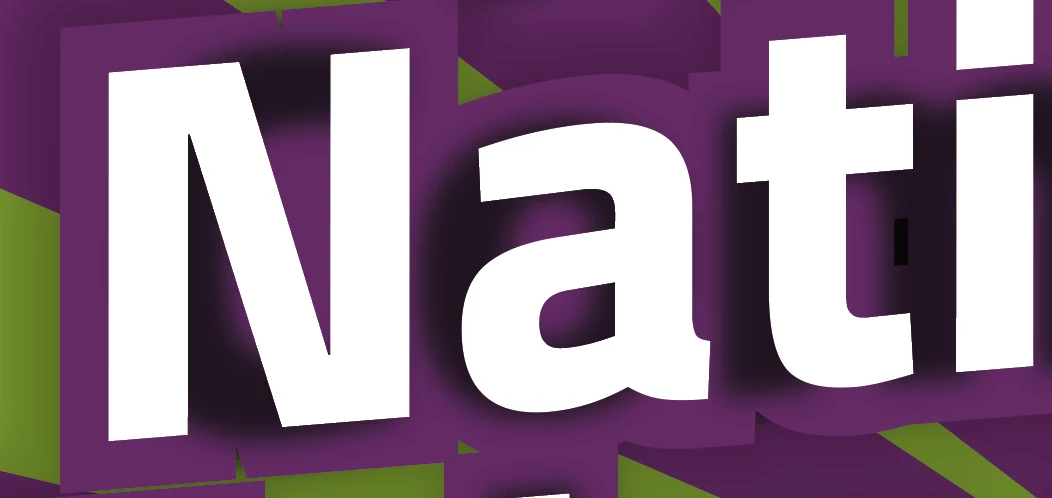
Screenshot below shows the residing drop shadow from the previous 'C', 'o' and 'm' even though the top layer is now 'Nat'.
 

This topic has been closed for replies.
Correct answer meganchi

The drop shadow was expanded, therefore, it is not text. You would need to delete the drop shadow "shapes", and then apply a brand new drop shadow effect to your new text.

2 replies

meganchi
meganchiCorrect answer
Legend
February 6, 2020

The drop shadow was expanded, therefore, it is not text. You would need to delete the drop shadow "shapes", and then apply a brand new drop shadow effect to your new text.

Participant
February 6, 2020

Thanks for clearing that up for me Meganchi.

Frustrating thing is though, I haven't been expanding them... Is there a reason why it would be expanding itself?

I'm just saving as the usual .ai file format. Just wanted to see if I have accidentally checked a box somewhere.

sishamIAGD
Community Expert
Community Expert
February 6, 2020

Are you able to share the file so we can see the breakdown of layers/groups or can you post a screenshot of the layers panel expanded so we can see what going on in there..?

Participant
February 6, 2020

Thanks for taking the time to respond.

Here's a shot of the layers. Interestingly it's saying that the drop shadows are 'images'. Is that usual?