Participating Frequently
April 3, 2024
Answered

Drop shadow on small images gets ragged when rotated

  • April 3, 2024
  • 6 replies
  • 747 views

When I place a big image and scale it to a very small size like for example 2x4cm like in the example attached, the drop shadow gets ragged. NB this only happens to linked images and not shapes or embeded images.


The yellow square is a shape but the blue square is a large PSD image scaled down.

 

This topic has been closed for replies.
Correct answer Monika Gause

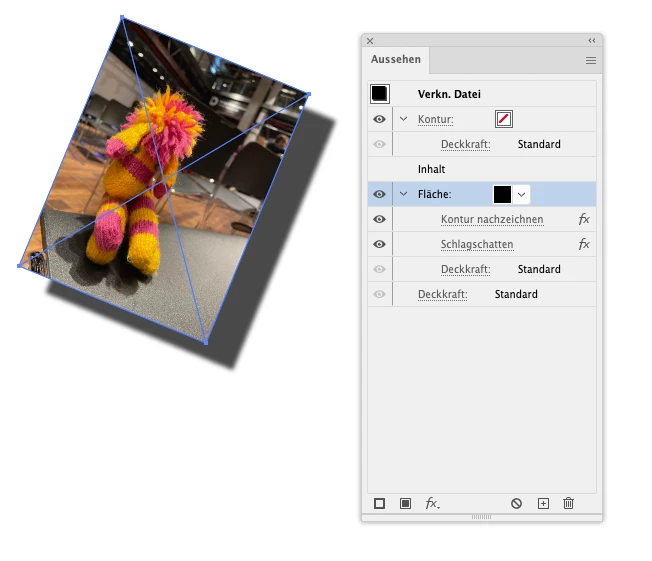
Instead of applying the shadow to the image directly, what you can do is

In the appearance panel set up a new fill for the placed image

Apply the Effect > Path > Outline object to that fill (only to that fill)

Apply the drop shadow to that fill.

6 replies

barbara_a7746676
Community Expert
Community Expert
April 11, 2024

I'm not able to replicate this issue. Are you using the most current version of Illustrator?

Monika Gause
Community Expert
Community Expert
April 11, 2024

It's there in the latest version. You need a huge image.

Monika Gause
Community Expert
Monika GauseCommunity ExpertCorrect answer
Community Expert
April 11, 2024

Instead of applying the shadow to the image directly, what you can do is

In the appearance panel set up a new fill for the placed image

Apply the Effect > Path > Outline object to that fill (only to that fill)

Apply the drop shadow to that fill.

Participating Frequently
April 12, 2024

Thanks a lot for this. It is a solution!

Although I would still call this a bug! I never recall having this issue in the past. Adobe should fix this.

kglad
Community Expert
Community Expert
April 4, 2024

in the future, to find the best place to post your message, use the list here, https://community.adobe.com/

p.s. i don't think the adobe website, and forums in particular, are easy to navigate, so don't spend a lot of time searching that forum list. do your best and we'll move the post (like this one has already been moved) if it helps you get responses.


<"moved from cc desktop bugs">
Participating Frequently
April 11, 2024

Thanks for the advice. Unfortuantely no one has replied with a solution!!!

Participating Frequently
April 3, 2024

It's in Illustrator. 

kglad
Community Expert
Community Expert
April 3, 2024

is this a photoshop question?

Participant
April 3, 2024

Hi, yes it is happening to me too. I always used this method in the past and never had these issues.