camilled30241157
Participant
Sep 5, 2017 3:57 PM UTC
Answered

Duplicate a layer without changing the name (without "... - copy"

Hello !

I would like to know if there is a parameter in order to : when you duplicate a layer, the name of the layer don't change ?

For example :

I want to duplicate the layer "My layer". But, I don't want that my new layer is called "My layer - copy".

Is-it possible ?

Thank you for your answer

This topic is closed to new replies. Start a new post to keep the conversation going.
Ronoso
RonosoCorrect answer
Participant
May 4, 2021 2:54 PM UTC

So, I don´t really know why this works for me but I hope it's not just luck.
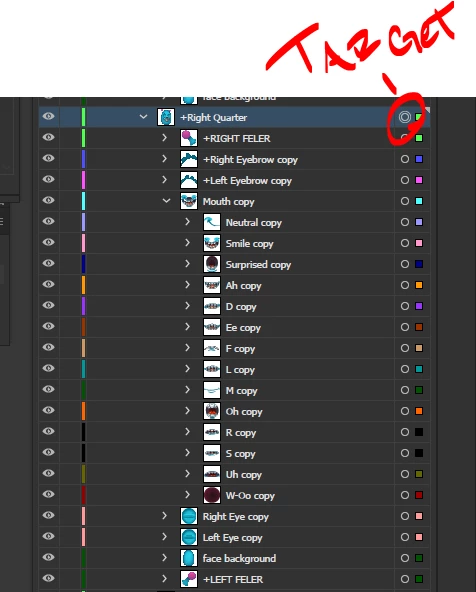
Turn ON "Paste Remembers Layers" in the Layers palette.
then select the group you want to copy by clicking on the target.
then Ctrl + C and Ctrl + F.

I don´t know why but it works for me, hope this helps!


23 replies

Ronoso
RonosoCorrect answer
Participant
May 4, 2021 2:54 PM UTC

So, I don´t really know why this works for me but I hope it's not just luck.
Turn ON "Paste Remembers Layers" in the Layers palette.
then select the group you want to copy by clicking on the target.
then Ctrl + C and Ctrl + F.

I don´t know why but it works for me, hope this helps!


Translate
Participant
Nov 14, 2024 6:46 AM UTC

Thank you so much, this is worked amazingly


Translate
Participant
Jun 27, 2018 7:16 PM UTC

Hello,

This minor problem of Illustrator automatically adding "copy" to a duplicated layer's name as well as to all its sub-layers has annoyed me as well. Especially if there are a lot of sub-layers, and you want them to retain their original names. I think I've got a simple and helpful workaround:

1) Turn ON "Paste Remembers Layers" in the Layers palette.

2) UNLOCK and make visible everything in the layer that you are duplicating.

3) SELECT everything in that layer and COPY to the clipboard.

4) RENAME the original layer (i.e. add 1 to the end of the name).

5) PASTE in FRONT (⌘+F). Illustrator will create a new layer with the original layer and sub-layers' names and contents.

6) Change the original layer's name back, if you wish.

I hope this helps.

Translate
jamesrhetor
Participant
Nov 27, 2018 12:25 AM UTC

THANK YOU! THANK YOU!

This is exactly the kind of workaround I've been looking to find for years, and I just got so frustrated I decided to check again.

You ROCK!

Translate
CarlosCanto
Community Expert
Community Expert
Nov 27, 2018 7:11 AM UTC

seriously? the workaround seems like a lot more work. Turning on Paste remembers layers, renaming source layer, renaming back source layer after pasting...isn't easier to rename duplicate layer?

Translate
Disposition_Dev
Legend
Nov 22, 2017 3:01 PM UTC

function test()

{

     var docRef = app.activeDocument;

     var layers = docRef.layers;

     var layerCopy = layers[0].duplicate();

     layerCopy.name = layers[0].name;

}

test();

Woops. disregard the above. duplicate is not a method of the layer class.

my sincere apologies.

Translate
camilled30241157
Participant
Sep 6, 2017 7:30 AM UTC

Thank you for your answers !

I have a lot of views with the common elements and it's painful to rename every time !

But there seems to be no solution...

Translate
c.pfaffenbichler
Community Expert
Community Expert
Sep 6, 2017 11:16 AM UTC

You should ask over on the Illustrator Scripting Forum, it might be possible to automate the duplicating and renaming and reduce it to a one keystroke task.

Translate
camilled30241157
Participant
Sep 6, 2017 12:01 PM UTC

Yes thank you ! Good idea

Translate
PrepressPro1
Legend
Sep 5, 2017 4:17 PM UTC

You can drag the layer to the New Layer Icon in the lower area of the Layers Panel.

Translate
rcraighead
Legend
Sep 5, 2017 4:43 PM UTC

But "Copy" is still added whether option dragging or dragging to "Layer" icon. I don't know of a way around this. I suppose it could be scripted.

Translate
PrepressPro1
Legend
Sep 5, 2017 8:30 PM UTC

The program does this to avoid duplicate layer names. You can rename the layer as you please.

Translate