
camilled30241157
Participant
September 5, 2017
Answered

Duplicate a layer without changing the name (without "... - copy"

  • September 5, 2017
  • 5 replies
  • 12308 views

Hello !

I would like to know if there is a parameter in order to : when you duplicate a layer, the name of the layer don't change ?

For example :

I want to duplicate the layer "My layer". But, I don't want that my new layer is called "My layer - copy".

Is-it possible ?

Thank you for your answer
This topic has been closed for replies.
Correct answer Ronoso

So, I don´t really know why this works for me but I hope it's not just luck.
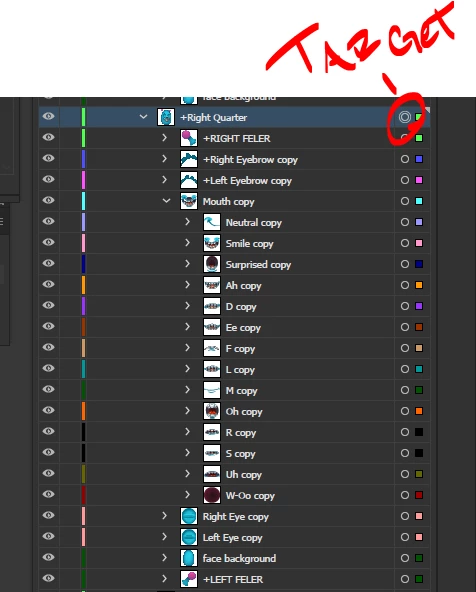
Turn ON "Paste Remembers Layers" in the Layers palette.
then select the group you want to copy by clicking on the target.
then Ctrl + C and Ctrl + F.

I don´t know why but it works for me, hope this helps!


5 replies

Ronoso
RonosoCorrect answer
Participant
May 4, 2021

So, I don´t really know why this works for me but I hope it's not just luck.
Turn ON "Paste Remembers Layers" in the Layers palette.
then select the group you want to copy by clicking on the target.
then Ctrl + C and Ctrl + F.

I don´t know why but it works for me, hope this helps!


Participant
November 14, 2024

Thank you so much, this is worked amazingly


Participant
June 27, 2018

Hello,

This minor problem of Illustrator automatically adding "copy" to a duplicated layer's name as well as to all its sub-layers has annoyed me as well. Especially if there are a lot of sub-layers, and you want them to retain their original names. I think I've got a simple and helpful workaround:

1) Turn ON "Paste Remembers Layers" in the Layers palette.

2) UNLOCK and make visible everything in the layer that you are duplicating.

3) SELECT everything in that layer and COPY to the clipboard.

4) RENAME the original layer (i.e. add 1 to the end of the name).

5) PASTE in FRONT (⌘+F). Illustrator will create a new layer with the original layer and sub-layers' names and contents.

6) Change the original layer's name back, if you wish.

I hope this helps.

jamesrhetor
Participant
November 27, 2018

THANK YOU! THANK YOU!

This is exactly the kind of workaround I've been looking to find for years, and I just got so frustrated I decided to check again.

You ROCK!

CarlosCanto
Community Expert
Community Expert
November 27, 2018

seriously? the workaround seems like a lot more work. Turning on Paste remembers layers, renaming source layer, renaming back source layer after pasting...isn't easier to rename duplicate layer?

Disposition_Dev
Legend
November 22, 2017

function test()

{

     var docRef = app.activeDocument;

     var layers = docRef.layers;

     var layerCopy = layers[0].duplicate();

     layerCopy.name = layers[0].name;

}

test();

Woops. disregard the above. duplicate is not a method of the layer class.

my sincere apologies.

camilled30241157
Participant
September 6, 2017

Thank you for your answers !

I have a lot of views with the common elements and it's painful to rename every time !

But there seems to be no solution...

c.pfaffenbichler
Community Expert
Community Expert
September 6, 2017

You should ask over on the Illustrator Scripting Forum, it might be possible to automate the duplicating and renaming and reduce it to a one keystroke task.

camilled30241157
Participant
September 6, 2017

Yes thank you ! Good idea

PrepressPro1
Legend
September 5, 2017

You can drag the layer to the New Layer Icon in the lower area of the Layers Panel.

rcraighead
Legend
September 5, 2017

But "Copy" is still added whether option dragging or dragging to "Layer" icon. I don't know of a way around this. I suppose it could be scripted.

PrepressPro1
Legend
September 5, 2017

The program does this to avoid duplicate layer names. You can rename the layer as you please.