Inspiring
August 12, 2022
Answered

"Duplicate Layer" command in Script

  • August 12, 2022
  • 1 reply
  • 1235 views

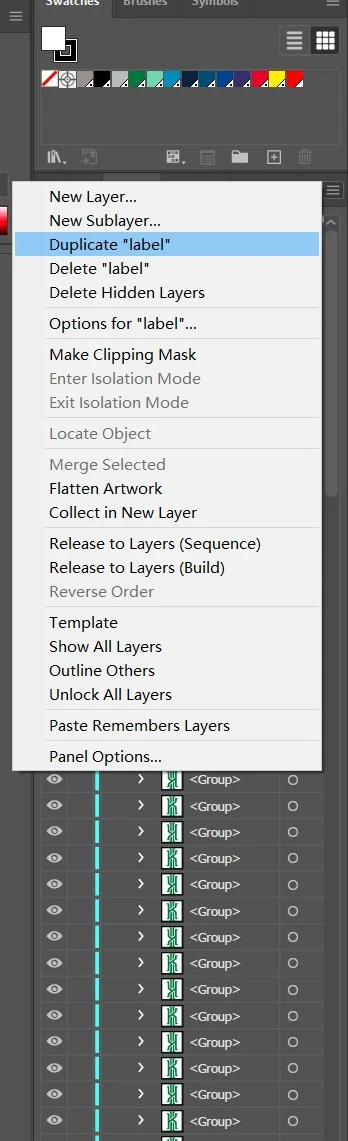
How to access the “Duplicate Layer” command in the layer panel with a script? I tried to find the relevant properties or methods in the script reference file, but I couldn't find, I also try to use the "ExecuteMenuCommand" methods, but I don't know what the corresponding command is. If there is no direct property or method, is there a script that can achieve the same function?


This topic has been closed for replies.
Correct answer Charu Rajput

Hi,

If I am understand your question correctly, you want to duplicate multiple layers all together. If thsi is the case, then you need to select the layer each time before running the duplicateLayer method. Below is the snippet that will duplicate all layers in the active document.

function duplicateLayer() {
    var actionString = "/version 3" +
        "/name [ 5" +
        "	5365742031" +
        "]" +
        "/isOpen 1" +
        "/actionCount 1" +
        "/action-1 {" +
        "	/name [ 15" +
        "		4475706c6963617465204c61796572" +
        "	]" +
        "	/keyIndex 0" +
        "	/colorIndex 0" +
        "	/isOpen 1" +
        "	/eventCount 1" +
        "	/event-1 {" +
        "		/useRulersIn1stQuadrant 0" +
        "		/internalName (ai_plugin_Layer)" +
        "		/localizedName [ 6" +
        "			53686f773a20" +
        "		]" +
        "		/isOpen 1" +
        "		/isOn 1" +
        "		/hasDialog 0" +
        "		/parameterCount 2" +
        "		/parameter-1 {" +
        "			/key 1836411236" +
        "			/showInPalette 4294967295" +
        "			/type (integer)" +
        "			/value 1" +
        "		}" +
        "		/parameter-2 {" +
        "			/key 1851878757" +
        "			/showInPalette 4294967295" +
        "			/type (ustring)" +
        "			/value [ 19" +
        "				4475706c69636174652053656c656374696f6e" +
        "			]" +
        "		}" +
        "	}" +
        "}" +
        "";

    var tmp = File(Folder.desktop + "/Set 1.aia");
    tmp.open('w');
    tmp.write(actionString);
    tmp.close();
    app.loadAction(tmp);
    app.doScript("Duplicate Layer", "Set 1", false);
    app.unloadAction("Set 1", "");
    tmp.remove();
}

var docRef = app.activeDocument
var _layers = docRef.layers;
app.executeMenuCommand('deselectall');
for (var l = 0; l < _layers.length; l++) {
    _layers[l].pageItems[0].selected = true;;
    duplicateLayer();
    app.executeMenuCommand('deselectall');
}

1 reply

Charu Rajput
Community Expert
Community Expert
August 12, 2022

Hi,

You can use the action to duplicate the layers.

function duplicateLayer() {
    var actionString = "/version 3" +
        "/name [ 5" +
        "	5365742031" +
        "]" +
        "/isOpen 1" +
        "/actionCount 1" +
        "/action-1 {" +
        "	/name [ 15" +
        "		4475706c6963617465204c61796572" +
        "	]" +
        "	/keyIndex 0" +
        "	/colorIndex 0" +
        "	/isOpen 1" +
        "	/eventCount 1" +
        "	/event-1 {" +
        "		/useRulersIn1stQuadrant 0" +
        "		/internalName (ai_plugin_Layer)" +
        "		/localizedName [ 6" +
        "			53686f773a20" +
        "		]" +
        "		/isOpen 1" +
        "		/isOn 1" +
        "		/hasDialog 0" +
        "		/parameterCount 2" +
        "		/parameter-1 {" +
        "			/key 1836411236" +
        "			/showInPalette 4294967295" +
        "			/type (integer)" +
        "			/value 1" +
        "		}" +
        "		/parameter-2 {" +
        "			/key 1851878757" +
        "			/showInPalette 4294967295" +
        "			/type (ustring)" +
        "			/value [ 19" +
        "				4475706c69636174652053656c656374696f6e" +
        "			]" +
        "		}" +
        "	}" +
        "}" +
        "";

    var tmp = File(Folder.desktop + "/Set 1.aia");
    tmp.open('w');
    tmp.write(actionString);
    tmp.close();
    app.loadAction(tmp);
    app.doScript("Duplicate Layer", "Set 1", false);
    app.unloadAction("Set 1", "");
    tmp.remove();
}

duplicateLayer();


Make sure, layer is selected in the Layers panel to dupliacte it.

Best regards
Inspiring
August 12, 2022

Hi @Charu Rajput 

This script work fine, thank you!

I want to make a loop to copy these layers in large numbers. It mean to execute this function in a loop. How do I realize it? Sorry, I know little about JS....


I tried below, but it can't work.

for (var i=1;i<4;i++)
{
    duplicateLayer();
}
 
Charu Rajput
Community Expert
Charu RajputCommunity ExpertCorrect answer
Community Expert
August 12, 2022

Hi,

If I am understand your question correctly, you want to duplicate multiple layers all together. If thsi is the case, then you need to select the layer each time before running the duplicateLayer method. Below is the snippet that will duplicate all layers in the active document.

function duplicateLayer() {
    var actionString = "/version 3" +
        "/name [ 5" +
        "	5365742031" +
        "]" +
        "/isOpen 1" +
        "/actionCount 1" +
        "/action-1 {" +
        "	/name [ 15" +
        "		4475706c6963617465204c61796572" +
        "	]" +
        "	/keyIndex 0" +
        "	/colorIndex 0" +
        "	/isOpen 1" +
        "	/eventCount 1" +
        "	/event-1 {" +
        "		/useRulersIn1stQuadrant 0" +
        "		/internalName (ai_plugin_Layer)" +
        "		/localizedName [ 6" +
        "			53686f773a20" +
        "		]" +
        "		/isOpen 1" +
        "		/isOn 1" +
        "		/hasDialog 0" +
        "		/parameterCount 2" +
        "		/parameter-1 {" +
        "			/key 1836411236" +
        "			/showInPalette 4294967295" +
        "			/type (integer)" +
        "			/value 1" +
        "		}" +
        "		/parameter-2 {" +
        "			/key 1851878757" +
        "			/showInPalette 4294967295" +
        "			/type (ustring)" +
        "			/value [ 19" +
        "				4475706c69636174652053656c656374696f6e" +
        "			]" +
        "		}" +
        "	}" +
        "}" +
        "";

    var tmp = File(Folder.desktop + "/Set 1.aia");
    tmp.open('w');
    tmp.write(actionString);
    tmp.close();
    app.loadAction(tmp);
    app.doScript("Duplicate Layer", "Set 1", false);
    app.unloadAction("Set 1", "");
    tmp.remove();
}

var docRef = app.activeDocument
var _layers = docRef.layers;
app.executeMenuCommand('deselectall');
for (var l = 0; l < _layers.length; l++) {
    _layers[l].pageItems[0].selected = true;;
    duplicateLayer();
    app.executeMenuCommand('deselectall');
}
Best regards