
Known Participant
February 5, 2025
Answered

Duplicate object (stroke) when saving to PDF

  • February 5, 2025
  • 2 replies
  • 1191 views

Hello guys,


I have a new strange situation in Illustrator when I'm saving file into PDF. 


I recorded a video https://capture.dropbox.com/dVf8f2p7buyxJiGF  as you can see the stroke that I selected are coloured by spot colour (CutContour), but after saving it into PDF format the same object it duplicate itself into another object with CMYK color stroke.... you can see that in the Acrobat window.


It's something without any logic to me.... Do you any idea?


Best

Francesco
Correct answer Brad @ Roaring Mouse

Hi Monika,


Do you mean layer could be a stroke property? Where can I found this preference? Just to know, it's a feature that I didn't know


Best

Francesco


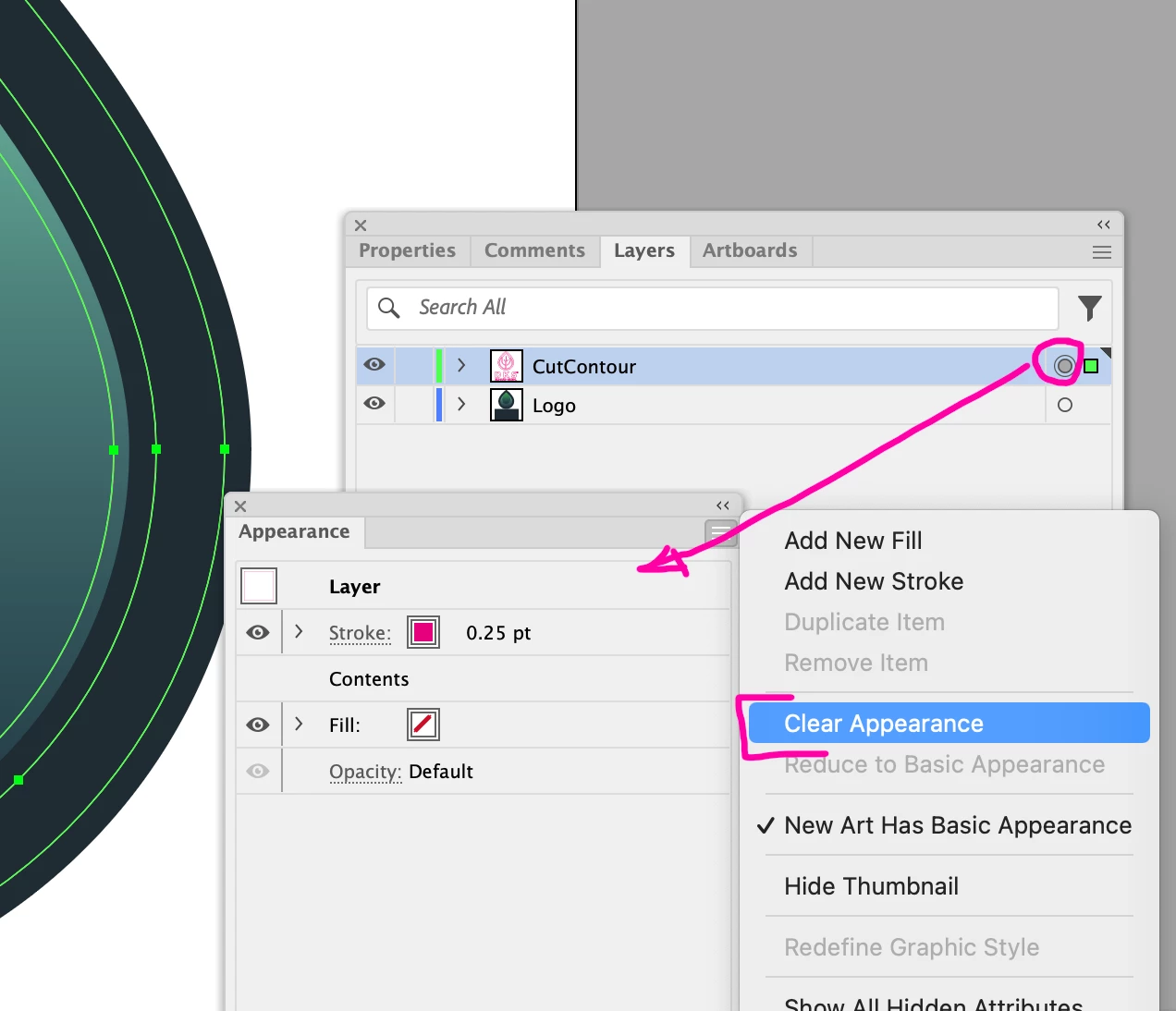
If you double-click on the filled grey circle on the layer panel, you can see what's assigned to it (Appearance Panel). You can then pull down Clear Appearance and the filled grey circle should go away, along with the errant .25pt magenta line.

2 replies

Brad @ Roaring Mouse
Community Expert
Community Expert
February 5, 2025

There is something weird about the layer you have your Contour on. It seems to have a default Appearance of a .25 pt 100M (Hence the filled grey circle on the layer panel)

I can't seem to clear it, but I found the easiest thing to do now is to select your Contour objects and move them to a NEW layer, and then delete the old one.

Don't forget to make your Contour objects to Overprint Stroke if the vendor needs it that way.

Known Participant
February 6, 2025

Hello Brad,

Thank you for your help, yes it seems work well on a new layer! Thanks, maybe some weird settings on layer properties.


Best,

Francesco

Monika Gause
Community Expert
Community Expert
February 6, 2025

@Francesco Stefanini  schrieb:

maybe some weird settings on layer properties.


The objects themselves have a stroke.

And then the layers has a stroke as well. 


All in all that makes two strokes.

Known Participant
February 5, 2025

I attached here the file