Inspiring
January 23, 2017
Question

Duplicate Pantones Within a Single Swatchbook

  • January 23, 2017
  • 1 reply
  • 464 views

Using the Pantone+ Solid Coated book.

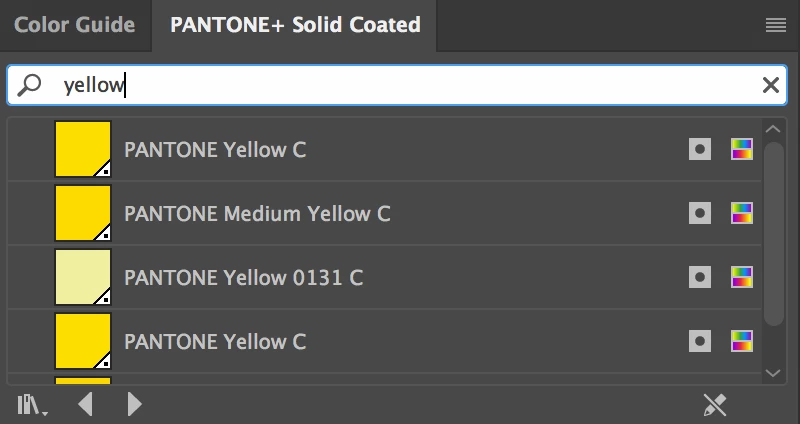
I've noticed when calling pantones there are duplicates sometimes. For instance when I search for Yellow C, it returns 2 "Yellow C" options. Why is this? There are other colors it does not do this for such as Red 485.

Just curious more than anything.
This topic has been closed for replies.

1 reply

Mike_Gondek10189183
Community Expert
Community Expert
January 23, 2017

The 2 you mention (highlighted below) are the exact same color (since they have the exact same name), and if you add each swatch to you document you get the same one, so this should cause you not technical issues, just looks sloppy and confusing.

Ultimately when you go to separate a document in spot color that goers by the exact name of the swatch, and since both have the same you will not get 2 spot channels for yellow even if you try to add both to your document(s).

mhosseyAuthor
Inspiring
January 23, 2017

I figure the duplicates are the same, part of me just wants to believe Illustrator has a reason for this. WHAT DOES THIS MEAN, ADOBE.

Mike_Gondek10189183
Community Expert
Community Expert
January 23, 2017

I doubt they had a reason for this, as this was fixed in the new V3 version.

They also seem to have gotten rid of the  0131C color which could easily be confused with the 131C which is darker orange yellow out of some special Designers book that I do not know of anyone who uses that.