
Participant
October 4, 2024
Question

Duplicated artboards in illustrator always copies the art in reverse order

  • October 4, 2024
  • 3 replies
  • 459 views

Here's a simplae explanation of what I keep running into:

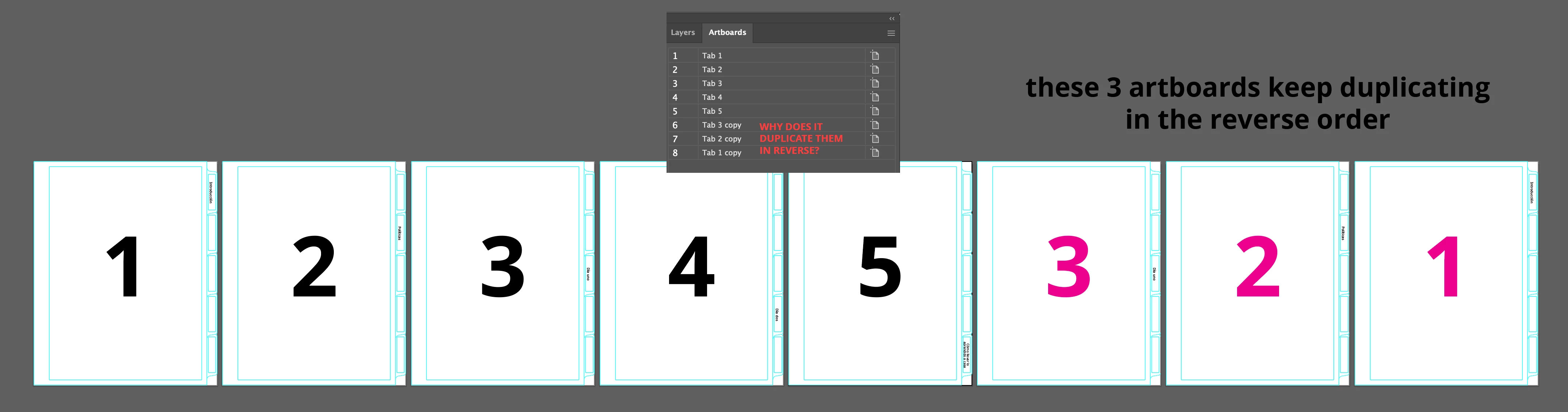
I have a simple document with 5 artboards as templates for binder tabs. I have a new document with 8 tabs, so I select and duplicate artboards 1 - 3 at the same time. In doing so Illustrator duplicates the tab artwork in reverse order.


So artboard 6 has the tab placement for 3, 7 has the placement of 2, and 8 has the placement of 1.

IT SHOULD BE 1-2-3-4-5-1-2-3 when it's actually doing 1-2-3-4-5-3-2-1.


Why can I not figure out how to duplicate the artboards art in the current order??
 

    3 replies

    Ton Frederiks
    Community Expert
    Community Expert
    January 13, 2025

    Try to Shift select the artboards in the Artboards panel.

    Click the Artboard tool and Alt - drag them on the Canvas to duplicate them.

    Participant
    January 13, 2025

    I'm having the same issue and it's annoying. Does anyone have a solution?

    kglad
    Community Expert
    Community Expert
    October 4, 2024

    in the future, to find the best place to post your message, use the list here, https://community.adobe.com/

    p.s. i don't think the adobe website, and forums in particular, are easy to navigate, so don't spend a lot of time searching that forum list. do your best and we'll move the post (like this one has already been moved) if it helps you get responses.


    <"moved from using the community">