


Duplicating files - 'Use Artboards' tick box permanently ticked
Hello,
We have noticed that often when working with some .ai files that the 'Use Artboards' button is locked:
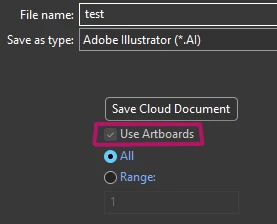
The files only have 1 Artboard anyway so I wouldnt expect this to be a problem, but it means that our files get duplicated with "-01" added to the end.

Both files are identical when opened in Illustrator, we work with thousands of Illustrator files and this is a nightmare for our version control and storage.
I can only find help articles asking to 'tick' the greyed out box, not 'untick' the greyed out box.
Any files we have where that box is unticked like normal do not have the duplicating problem.
Using latest Illustrator Version 29.8.1. I have experienced the same issue with 29.8 and 29.71.
It is unclear how this is happening because it is not every file we work on, sometimes it happens to new files created from scratch, sometimes older legacy files created on previous versions.
This issue is being experienced by everyone in our team, and resetting our illustrator settings, or reinstalling doesnt seem to fix it. So I expect it is a file specific issue.
The only solution I can find that works is to Save as Copy, and that new file will work as expected.
Does anyone have any more information on why this may be happening? Or advice for how to untick that box?
I have tried to attach the example files here but the site is giving me this error, could also be a symptom of the file problem:

Thank you.
 AdChoices