
Participant
January 17, 2023
Answered

Edges in the blend tool on a track

  • January 17, 2023
  • 1 reply
  • 281 views

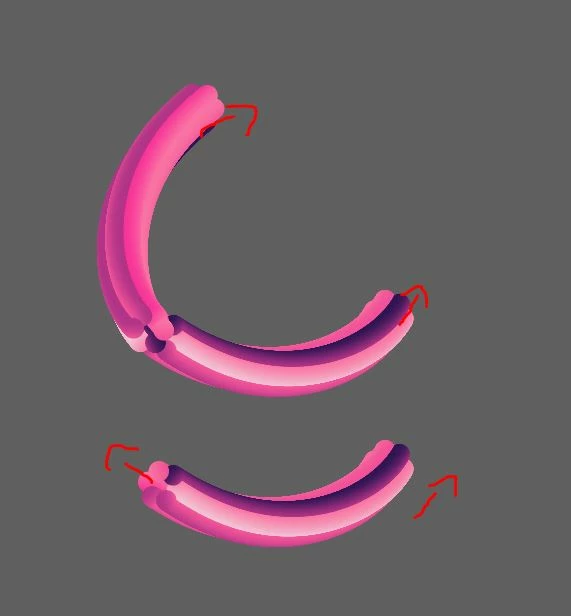
Is there a possibility in the blend tool, when applying a blend to a track, to apply it so that both ends face the same side and not one goes out and one goes in in terms of the 3D?
Would appreciate help
Thanks
 

This topic has been closed for replies.
Correct answer Monika Gause

A blend can have several in-between stages. If it's a group like in your example, the stages should have the same number of elements in them. They don't need to, but the result is more predictable that way. You cannot combine two blends after having created them, but you can release both blends and then then make a new one that has those 3 base elements.

1 reply

Monika Gause
Community Expert
Community Expert
January 17, 2023

I don't think I understand your question. These are two blends?

Participant
January 19, 2023

look on the upper 3D line i atteched

 now it's 2 blends that it's edges finish in the same side

i want it to be 1 blend, is it possible?

thank you

Monika Gause
Community Expert
Monika GauseCommunity ExpertCorrect answer
Community Expert
January 19, 2023

A blend can have several in-between stages. If it's a group like in your example, the stages should have the same number of elements in them. They don't need to, but the result is more predictable that way. You cannot combine two blends after having created them, but you can release both blends and then then make a new one that has those 3 base elements.