sheisverycheeky
Participating Frequently
September 25, 2020
Answered

edit colors- reduce colors not working correctly

  • September 25, 2020
  • 3 replies
  • 546 views

Hi,

I have a big eps art file I opened in illustrator.  The art contains 37342 colors. I need to reduce it to 8.  I attempted this but now the art contains 429 colors. I've attached a file to better explain how I tried to do this.  Please help!

Thanks!

This topic has been closed for replies.
Correct answer kphotopage

Hi, You can try this script.

https://github.com/robotwood/Random-Swatch-Fill


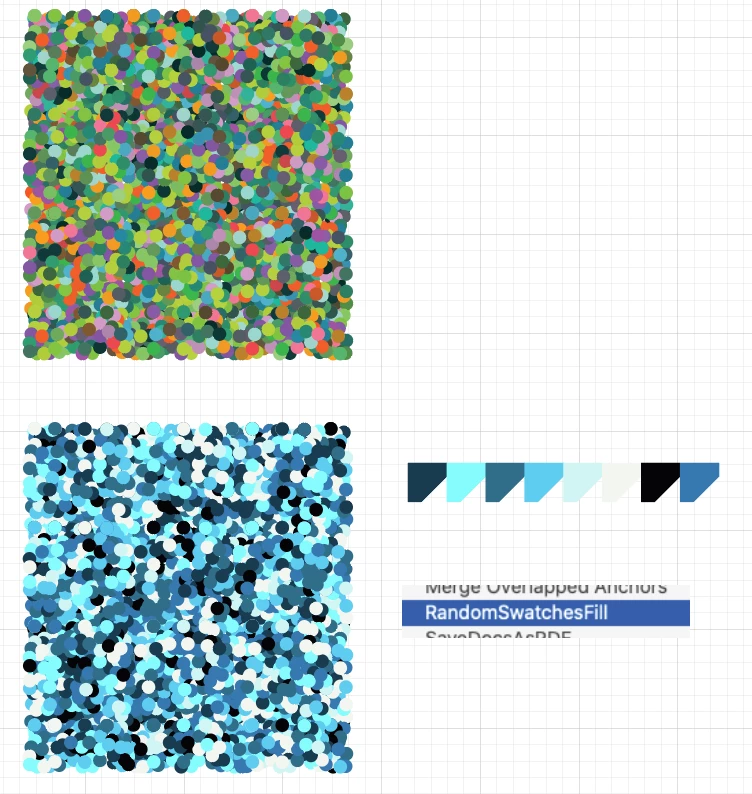
Here I started with 82 colors.

With this script, I narrowed it down to 8.


K
3 replies

kphotopage
kphotopageCorrect answer
Legend
September 27, 2020

Hi, You can try this script.

https://github.com/robotwood/Random-Swatch-Fill


Here I started with 82 colors.

With this script, I narrowed it down to 8.


K

Ashutosh_Mishra
Inspiring
September 25, 2020

Hi there,


Thanks for reaching out. In addition to what Marlon has suggested, please check out this help article to know how you can reduce colors in artwork.

Hope it helps.


Regards,

Ashutosh

marliton
Community Expert
Community Expert
September 25, 2020

Hi. What about if you create a Color Group with 8 colors, then go to Edit > Edit colors > Recolor with presets > Color library > Document swatches and choose the Color group?


Marlon Ceballos
sheisverycheeky
Participating Frequently
September 25, 2020

Hi Marlon,  getting there. now it says 14 colors but I see 4 and need 8 total.  THANK YOU!