
Participant
December 13, 2018
Answered

Editing Texts from downloaded files

  • December 13, 2018
  • 3 replies
  • 927 views

I have several downloaded files that say that the text can be edited. How do I edit the text in that I just type where the previous text is located and be done with it? It either just clicks the individual letters or the small type setting appears. It just seems so complicated. I'm sure it can be made simpler.

Thanks
    This topic has been closed for replies.
    Correct answer jane-e

    Hi James,

    If you did not create these files yourself, then you need to see how they were created.

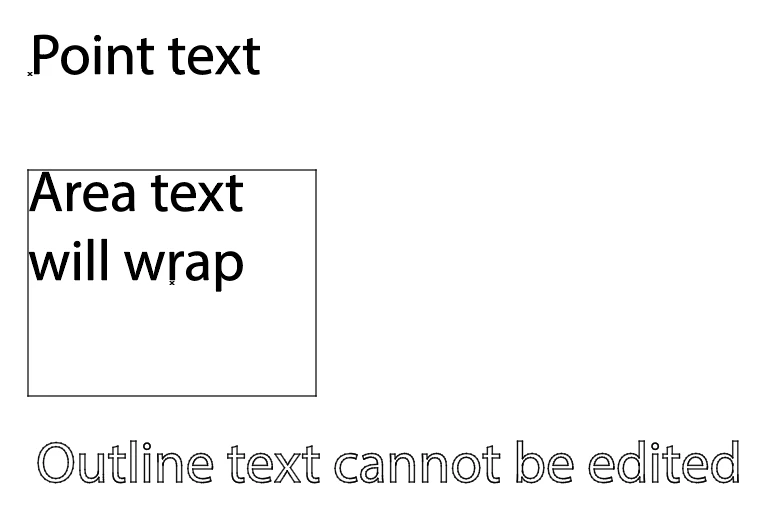
    Live text can be Point type or Area Type. Text can also be converted to outlines, which is not editable.

    Go to View > Outline. Which of these three does your text look like?

    ~ Jane

    3 replies

    Myra Ferguson
    Community Expert
    Community Expert
    December 13, 2018

    You can try using OCR in Acrobat to convert the outlined text back into editable text.

    1. Save the AI file as a PDF.

    2. Open the PDF in Acrobat.

    3. Type "OCR" in Find Tools on the right side.

    4. Select Recognize Text from the returned results.

    5. Click on the Recognize Text button at the top.

    You can either save the PDF and edit it Illustrator or copy/paste the converted text into your AI version of the file.

    Don't expect a perfect conversion, which can vary depending on the font that was used.

    superc51632781
    Participating Frequently
    December 13, 2018

    you have to convert

    to text mode from there just edit!

    convert to text!!

    jane-e
    Community Expert
    Community Expert
    December 13, 2018

    superc51632781  wrote

    you have to convert to text mode from there just edit!

    Hi Super C,

    Illustrator does not have a convert to text mode. Please don't add confusing misinformation. Thanks!

    jane-e
    Community Expert
    jane-eCommunity ExpertCorrect answer
    Community Expert
    December 13, 2018

    Hi James,

    If you did not create these files yourself, then you need to see how they were created.

    Live text can be Point type or Area Type. Text can also be converted to outlines, which is not editable.

    Go to View > Outline. Which of these three does your text look like?

    ~ Jane

    Participant
    December 13, 2018

    OMG! The 3rd one! These were companies out there that claimed it could be edited....I'm extremely angry now.....Do you know of anyone who does designs i.e. tshirts etc that's easily editable? Anyone?

    Thanks so much for your feedback

    jane-e
    Community Expert
    Community Expert
    December 13, 2018

    Hi James,

    I don’t do t-shirts, sorry! Open your layers panel from the View menu and see if there are any hidden layers that have editable text.

    Once text has been outlined, there is no going back.

    You could type new text and try to make it match with formatting. Or you could see if the company has tech support.

    You can post a screen shot if you want. I’m going to bed soon, but can look at it in the morning if another volunteer hasn’t stepped in.

    At least now you won’t keep trying.

    ~ Jane