
Inspiring
May 6, 2024
Answered

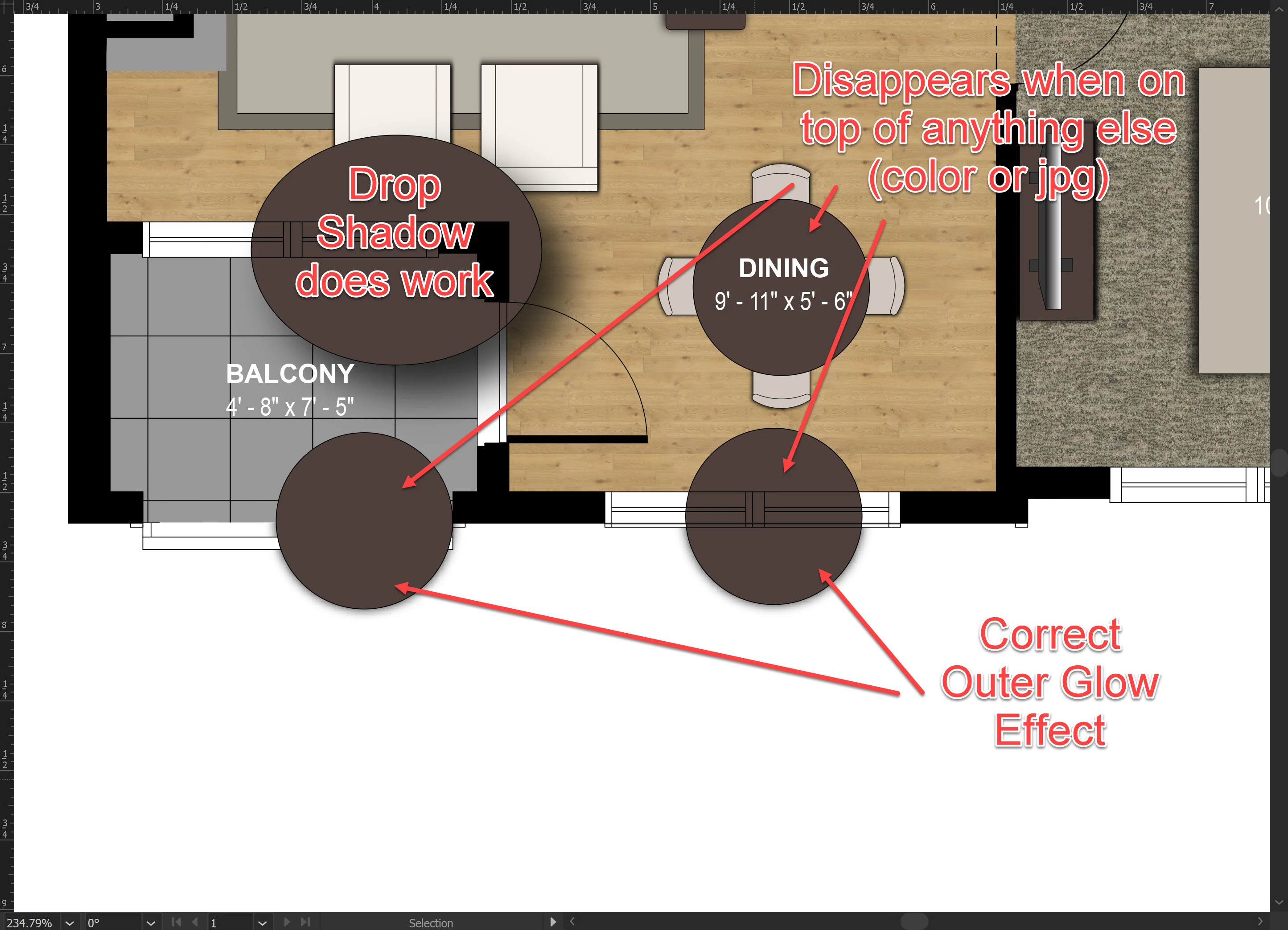
Effects disappear when object is on top of another

  • May 6, 2024
  • 1 reply
  • 528 views

I am trying to make a shadow effect on a floor plan (I do NOT want a directional shadow).  When I add an outer glow, it looks good on a white background, but when I move it on top of anything else (color/object, jpg, etc.) it disappears.


Is this a bug?  


(Note that the other shadows in the plan are png files, not created in Illustrator)
 

This topic has been closed for replies.
Correct answer Alessandro Anselmi

You can use the drop shadow at x:0 y:0 distance

or

make sure you have selected multiply as opacity method of your outer glow

1 reply

Alessandro AnselmiCorrect answer
Participating Frequently
May 6, 2024

You can use the drop shadow at x:0 y:0 distance

or

make sure you have selected multiply as opacity method of your outer glow

Inspiring
May 6, 2024

That ds trick worked, thanks!  Can't believe I didn't think of that before 😛


Inspiring
May 6, 2024

fyi, the og effect was set to multiply