
Known Participant
September 18, 2023
Answered

Effects > Pathfinder > Merge

  • September 18, 2023
  • 2 replies
  • 648 views

Anybody managed to successfully use this function.

I'd like to use it to merge a of circles, I would like to leave them live so I can change the size and stroke after the fact. Ideally my workflow would be Elipse>Duplicate>Blend MAKE>Effects OFFSET PATH>Effects MERGE.

I have tried using this function on groups of shapes and layers as advised but I cant get it to work. Hard one to google because all I get is the standard pathfinder window, not the effect.
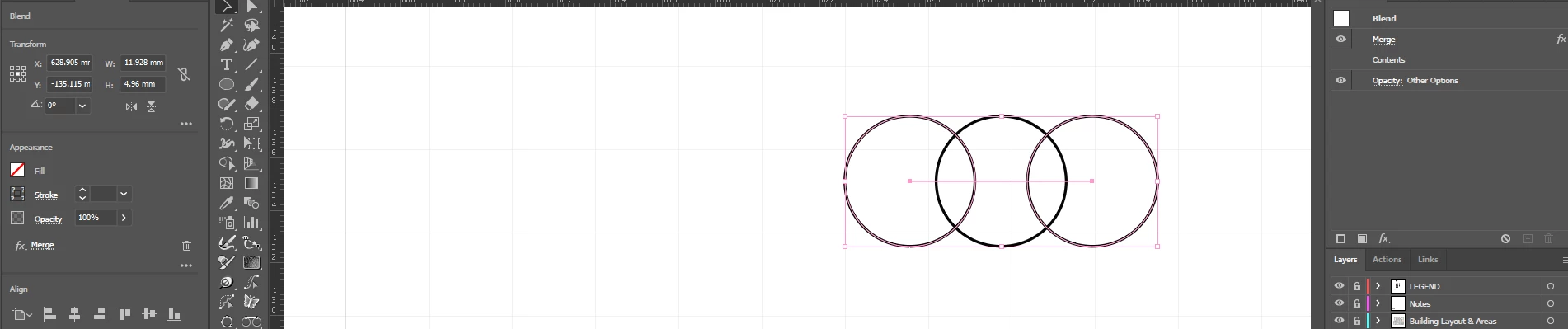


Thanks and regards
Sam
This topic has been closed for replies.
Correct answer Ton Frederiks

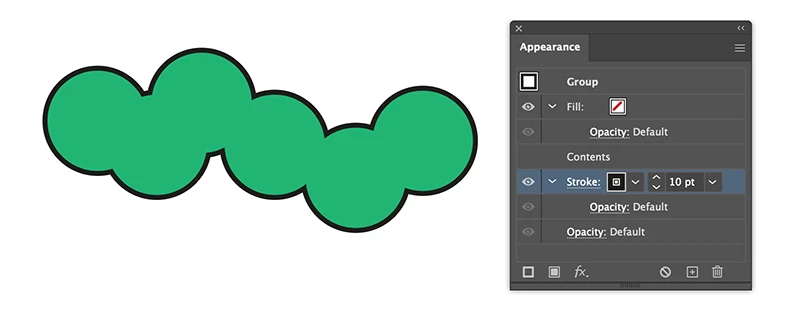
Maybe just duplicate filled circles, group them and apply a stroke in the Appearance panel to the group below the contents.

They can still be individually moved, deleted and new ones can be added to the group.

2 replies

Ton Frederiks
Community Expert
Community Expert
September 18, 2023

If I understand correctly, you may want to transform a circle with the Transform effect to get copies.

Use the Pathfinder Add Effect to merge them

The stroke and fill can be none.

Group the result, give it a fill and stroke.


Known Participant
September 18, 2023

Great thank Ton

That seems to work well if the intial shape has a fill, but doesnt seem to effect No Fill shapes.


Ill play around a bit more with blends and see if the same applies

Ton Frederiks
Community Expert
Ton FrederiksCommunity ExpertCorrect answer
Community Expert
September 18, 2023

Maybe just duplicate filled circles, group them and apply a stroke in the Appearance panel to the group below the contents.

They can still be individually moved, deleted and new ones can be added to the group.

Monika Gause
Community Expert
Community Expert
September 18, 2023

What it is that you want to achieve with this procedure?

Known Participant
September 18, 2023

Hi Monika

I'm looking to create a 'merged cannopy' effect using a series of circles, as you would see in an avenue of trees from abouve. It would be great if each circle was independent, so they can be quickly moved or deleted. Alterting the achor points after merging is difficult and time consuming. Bonus points if I can use Document Info>objects to count the circles quickly.

Thanks for your input