
Participant
June 19, 2025
Question

Ellipse tool issue

  • June 19, 2025
  • 4 replies
  • 330 views

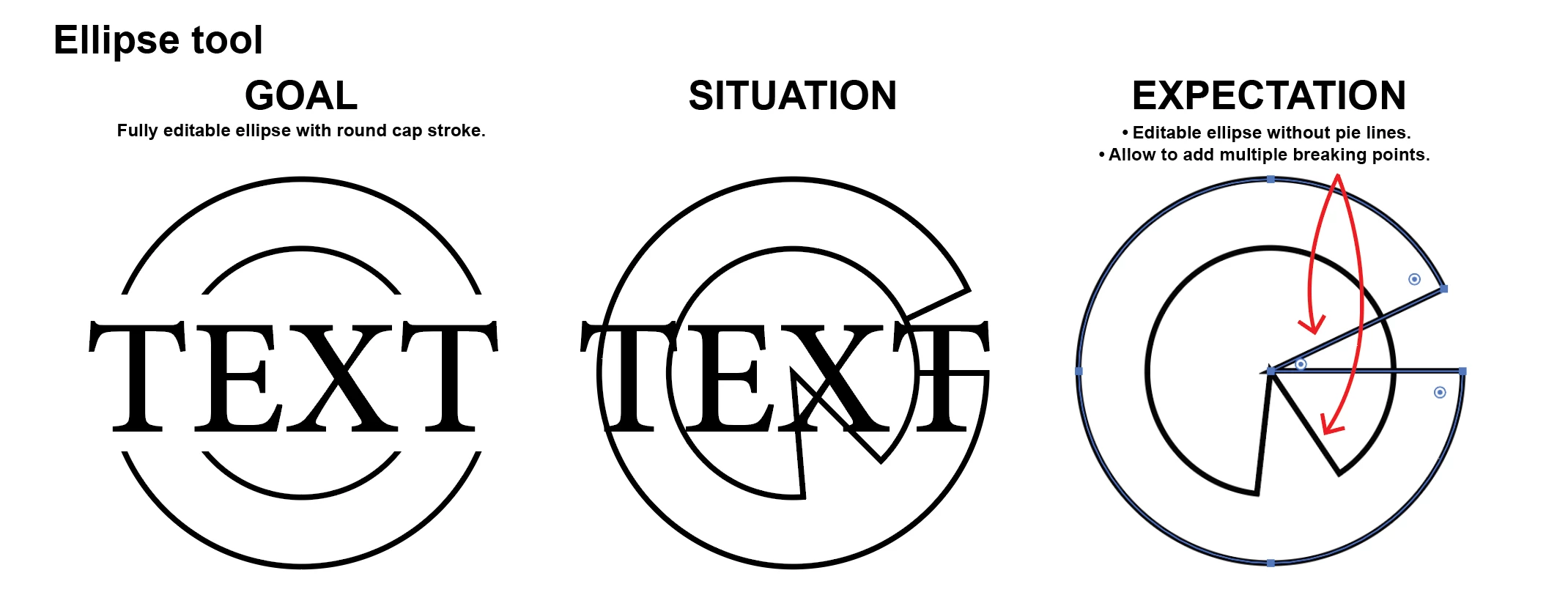
Illustrator 29.5.1, on macbook pro M2: I am having issue with ellipse tool... i work on logos a lot and it would be better if you can give user more flexibleity to add breaking points and withouth have the pie lines in the center. 
4 replies

Jacob Bugge
Community Expert
Community Expert
June 19, 2025

Sambhu,


As I (mis)understand it, if you were satisfied with the horizontal cutoffs  shown under GOAL, you could just use the white rectangle under the TEXT, which hides the inner parts of the circle, as an Opacity Mask with Invert Mask ticked, and this would make the Elleipse fully editable in ebery way.


However, the desired Round Cap strokes require an actual cutting of the ellipses which means that you will end up with two pairs of arcs; and for a change you will have to start over, which you can do by keeping a backup of the ellipses and the rectangle


The change is quite easy to make, using the rectangle in a different way as follows, see the images below showing the outcome of each step:


1) Make sure that the ellipses have Round Caps, and give the rectangle a stroke and no fill to make it visible;

2) With only the rectangle selected, use the dropdown Object>Path>Divide Objects below;

3) With the normal Selection Tool, ClickDrag across the middle and press Delete to remove the central part in one go;

4) Deselect and switch to the Direct Selection Tool, then ClickDrag over the central part of the horizontal path segments (upper and lower) and press Delete (in this way you select all the unwanted horizontal parts in one go).


Click to get closer, Click again to get closer still and enjoy the Round Caps


Ton Frederiks
Community Expert
Community Expert
June 19, 2025

Like this scripit by SATO Hiroyuki

http://shspage.com/aijs/en/#ovalize

Ton Frederiks
Community Expert
Community Expert
June 19, 2025

Object > Path > Shape > Expand Shape (you may want to assign a shortcut for that) will remove the pie lines.

And there are scripts that let you create a circle with the number of anchor pointa you want.


SambhuAuthor
Participant
June 19, 2025

I dont want to expand the shape, i want to keep the ellipse editable so athat i can chage the ellipse in future as i want.

Ton Frederiks
Community Expert
Community Expert
June 19, 2025

It remains an editable circle without the pie option.

Abhishek Rao
Community Manager
Community Manager
June 19, 2025

Hi @Sambhu,


Thank you again for sharing the visual and explaining your workflow. I understand how important this functionality is for your design process, and I’m really sorry it’s not available at the moment.

Would you mind creating a feature request on our UserVoice platform here: https://adobe.ly/464YRjf? Adding your comments and example there helps our product team prioritize this request, and you'll also receive notifications if there are any updates or progress on it.


Let me know once it's up or if there's anything else I can assist with in the meantime!

Abhishek